Addition of Binary Numbers (AQA GCSE Computer Science): Revision Notes
📚Revision Notes
Binary arithmetic - Addition of binary numbers
What is binary addition?
Binary addition works very similarly to the decimal addition you're already familiar with. The main difference is that instead of carrying when a column adds up to 10 or more, we carry when it adds up to 2 or more (since binary only uses 0s and 1s).
Just like with decimal numbers, we line up the digits in columns and add from right to left, carrying over to the next column when needed.
Basic binary addition rules
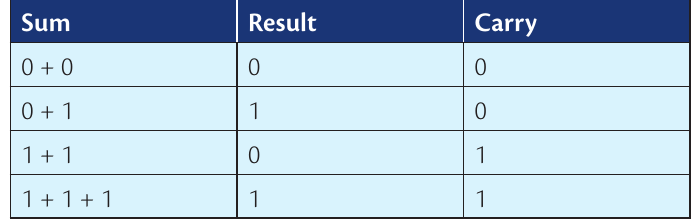
To understand binary addition, you need to know what happens when you add any two binary digits together. Here's the complete truth table that shows all possible combinations:
| Sum | Result | Carry |
|---|---|---|
Let's break down what each row means:
- with no carry (just like in decimal)
- with no carry (just like in decimal)
- with a carry of 1 (this is where it gets different!)
- with a carry of 1 (when we have a carry from the previous column)
Note
The fundamental difference between binary and decimal addition is the point at which we carry. In decimal, we carry when the sum reaches 10. In binary, we carry when the sum reaches just 2!
Understanding carries in binary
The key concept to remember is:
- In decimal: when a column adds up to 10 or more, we write down the units digit and carry the tens digit
- In binary: when a column adds up to 2 or more, we write down 0 and carry 1 to the next column
Important
Key Binary Addition Facts:
- in binary (which equals 2 in decimal)
- in binary (which equals 3 in decimal)
Remember: Two ones make ten - this is the most important rule to memorise!
Step-by-step method for binary addition
Note
Binary Addition Method:
- Line up the numbers in columns with the rightmost digits aligned
- Start from the rightmost column and work left
- Add the digits in each column (including any carry from the previous column)
- If the sum is 0 or 1, write it down with no carry
- If the sum is 2 (which is in binary), write down 0 and carry 1
- If the sum is 3 (which is in binary), write down 1 and carry 1
- Continue until you've processed all columns
Worked example 1: Adding two 4-bit numbers
Example
Worked Example: Adding 1101 + 1111
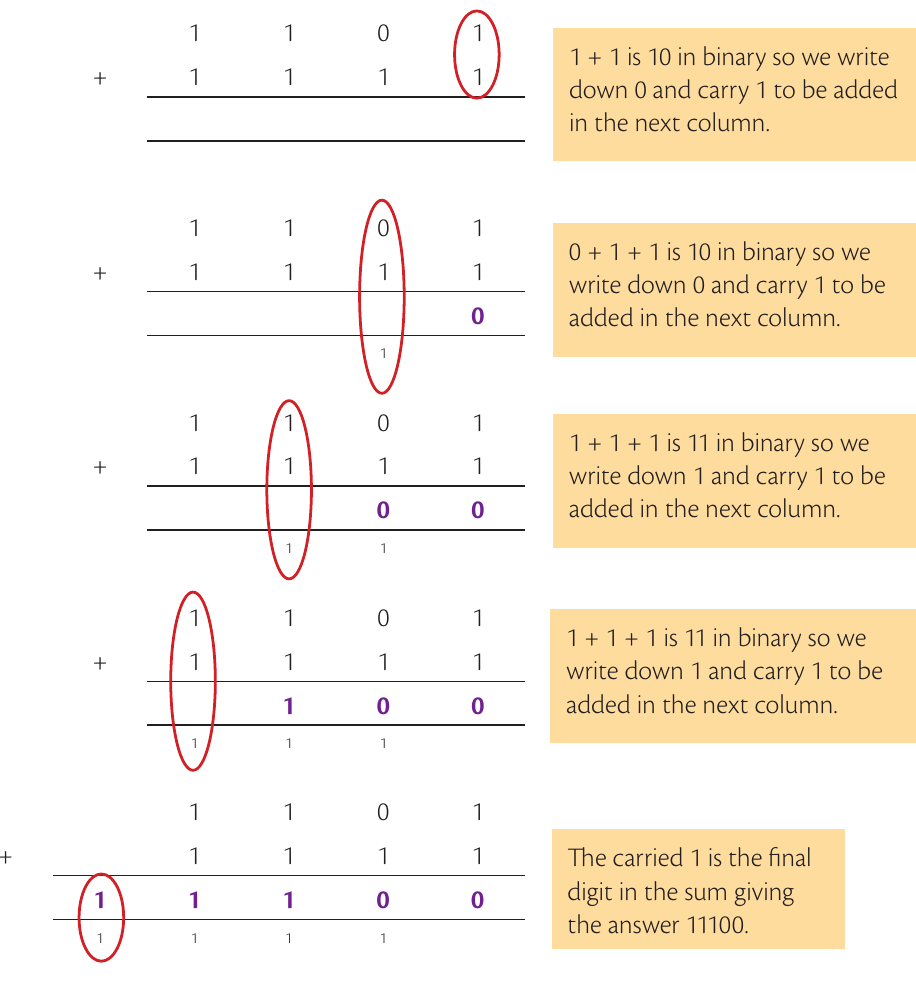
Starting from the rightmost column:
- Column 1: (binary), so we write 0 and carry 1
- Column 2: (carry) (binary), so we write 0 and carry 1
- Column 3: (carry) (binary), so we write 1 and carry 1
- Column 4: (carry) (binary), so we write 1 and carry 1
- Final carry: The leftmost carry gives us our final digit
Result:
Worked example 2: Adding numbers with different lengths
Sometimes you'll need to add binary numbers that have different numbers of digits. The process is exactly the same - just imagine the shorter numbers have leading zeros.
Example
Worked Example: Adding Numbers of Different Lengths
For instance, adding three numbers of different lengths:
- Start with the rightmost column and work left
- Add all digits in each column plus any carry
- Apply the same rules for when to carry
- Continue until all columns are complete
The key is to be methodical and work through each column carefully, making sure you account for all carries properly.
Key exam points
Important
GCSE Exam Expectation:
In your GCSE exam, you'll be expected to add up to three binary numbers using a maximum of 8 bits per number. The sum will never exceed 8 bits in the final answer.
This means you won't encounter extremely long calculations, but you do need to be confident with the carrying process and accurate with your working.
Tips for success
Note
Success Strategies:
- Practice the truth table until you know it by heart
- Always work from right to left - just like decimal addition
- Keep track of carries - write them down clearly
- Double-check your work by converting to decimal and verifying
- Line up your columns neatly to avoid mistakes
Remember!
Summary
Key Points to Remember:
- Binary addition follows the same column method as decimal addition
- The key difference is carrying when the sum reaches 2 instead of 10
- in binary (write 0, carry 1)
- in binary (write 1, carry 1)
- Always work from right to left, column by column
- In exams, you'll work with a maximum of 8 bits per number