Converting Between Binary and Hexadecimal (AQA GCSE Computer Science): Revision Notes
📚Revision Notes
Converting between binary and hexadecimal
Converting between binary and hexadecimal is much easier than you might think! This is because there's a special relationship between these two number systems that makes conversion quick and straightforward.
Understanding the relationship
The key to understanding binary-hexadecimal conversion lies in recognising that hexadecimal uses base 16, and 16 is exactly . This means that every single hexadecimal digit can represent exactly 4 binary digits.
Note
A 4-bit binary number is called a nibble, and this is the foundation of all conversions between binary and hexadecimal. Each nibble can represent values from 0 to 15 in decimal, which perfectly matches the 16 symbols used in hexadecimal (0-9 and A-F).
Conversion reference table
Here's the essential reference table that shows how binary and hexadecimal relate to each other:
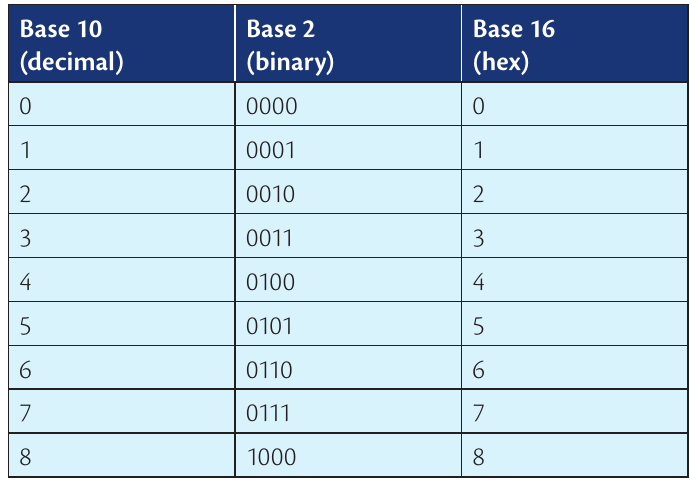
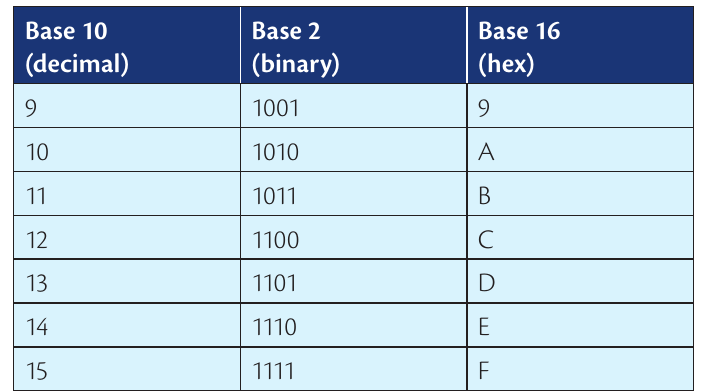
As you can see from the table, each hexadecimal digit corresponds to exactly one 4-bit binary pattern. For example, the hex digit 'A' always equals the binary pattern '1010', and the hex digit 'F' always equals '1111'.
Converting binary to hexadecimal
When converting from binary to hexadecimal, we use the nibble method. Here's how it works:
- Split the binary number into groups of 4 bits (nibbles), starting from the right
- Add leading zeros if the leftmost group has fewer than 4 bits
- Convert each 4-bit group to its hexadecimal equivalent using the reference table
- Combine the hex digits to get your final answer
Example
Worked Example: Converting Binary 11011111 to Hexadecimal
Step 1: Split into nibbles: 1101 and 1111 Step 2: Convert each nibble using the reference table:
- 1101 = D
- 1111 = F Step 3: Combine the results:
Example
Worked Example: Converting Binary 1011101 to Hexadecimal
Step 1: Split into nibbles (adding leading zero): 0101 and 1101 Step 2: Convert each nibble:
- 0101 = 5
- 1101 = D Step 3: Combine the results:
Converting hexadecimal to binary
Converting from hexadecimal to binary is even simpler because we just reverse the process:
- Take each hexadecimal digit individually
- Convert each digit to its 4-bit binary equivalent using the reference table
- Combine all the 4-bit groups to create your final binary number
Example
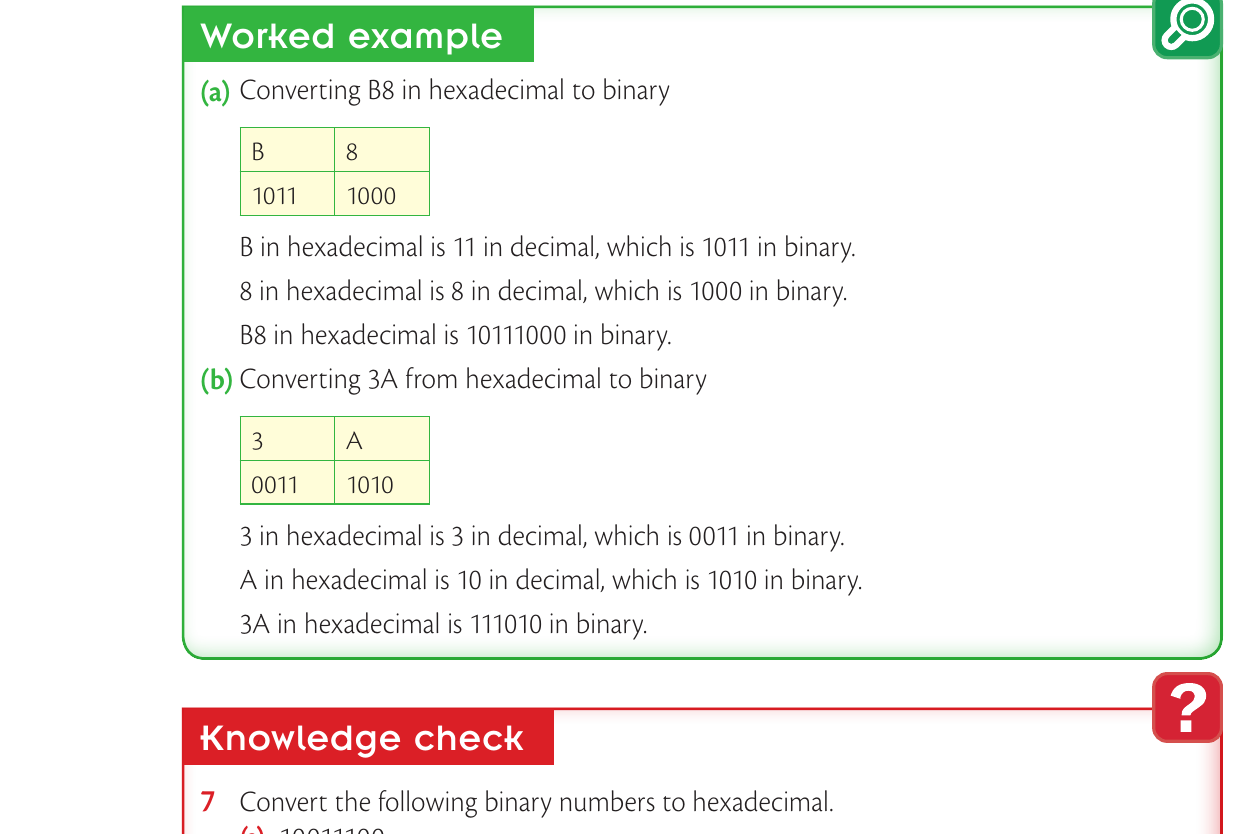
Worked Example: Converting B8 from Hexadecimal to Binary
Step 1: Convert each hex digit separately:
- B = 1011
- 8 = 1000 Step 2: Combine the results:
Example
Worked Example: Converting 3A from Hexadecimal to Binary
Step 1: Convert each hex digit separately:
- 3 = 0011
- A = 1010 Step 2: Combine the results:
Key points for your exam
Important
Essential Exam Information:
- You'll work with numbers in specific ranges: 00-FF in hexadecimal, 0-255 in decimal, and 00000000-11111111 in binary
- Each hexadecimal digit always converts to exactly 4 binary digits - no exceptions!
- Use the reference table - you don't need to memorise all conversions, but knowing the common ones (like A=10, F=15) will save time
- Always check your work by converting back the other way
The beauty of binary-hexadecimal conversion is its consistency. Once you understand that 1 hex digit = 4 binary digits, the rest follows naturally.
Summary
Key Points to Remember:
- Each hexadecimal digit represents exactly 4 binary digits (a nibble)
- To convert binary to hex: group into 4s, then convert each group
- To convert hex to binary: convert each hex digit to 4 binary digits
- Add leading zeros when needed to make complete 4-bit groups
- The range for GCSE is 00-FF (hex), 0-255 (decimal), 00000000-11111111 (binary)