Binary Representation in Computers (AQA GCSE Computer Science): Revision Notes
📚Revision Notes
Binary representation in computers
What is binary representation?
Binary representation is the fundamental way that computers store and process all information. Every piece of data in a computer - whether it's a number, letter, image, or sound - is stored using only two symbols: 1 and 0.
Think of binary like a massive collection of light switches. Each switch can only be in one of two positions: ON (represented by 1) or OFF (represented by 0). Computers contain millions of these tiny electronic switches, and by combining different patterns of 1s and 0s, they can represent any type of information.
Note
The light switch analogy is particularly helpful for understanding binary. Just as you can create different lighting patterns in your house by turning various switches on or off, computers create different data patterns using millions of electronic switches in different ON/OFF combinations.
Why do computers use binary?
Computers use binary because of how they are built. At the most basic level, computer circuits work with electricity, which can either flow (ON) or not flow (OFF). This creates a perfect match with the binary number system:
- 1 = ON (electricity flowing)
- 0 = OFF (no electricity flowing)
Important
This simple two-state system is very reliable and easy for computer circuits to detect and process. It's much easier for a computer to tell the difference between "completely on" and "completely off" than to measure dozens of different voltage levels.
Understanding number bases
Different number systems use different bases. The base tells us how many different symbols we can use in that system:
- Decimal (Base 10): Uses 10 symbols (0, 1, 2, 3, 4, 5, 6, 7, 8, 9)
- Binary (Base 2): Uses 2 symbols (0, 1)
- Hexadecimal (Base 16): Uses 16 symbols (0-9, A-F)
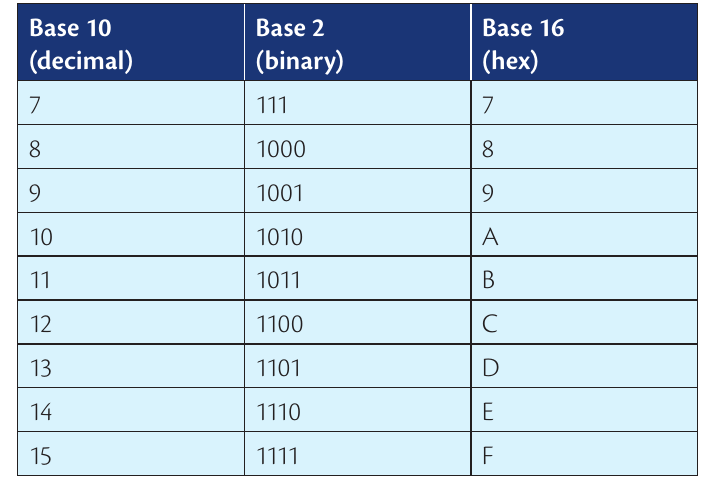
The table above shows how the same numbers can be written in different bases. For example, the decimal number 10 becomes 1010 in binary and A in hexadecimal.
What can binary represent?
The amazing thing about binary is that it can represent absolutely any type of data. The same binary sequence might represent completely different things depending on how the computer interprets it.
Example
Binary Interpretation Example
The binary number 01000100 could represent:
- Part of a digital image (pixel colour information)
- A small piece of a sound recording (audio data)
- The letter 'D' (text character)
- The decimal number 68 (numerical value)
The computer needs additional information to know what type of data each binary number represents!
The computer needs additional information to know what type of data each binary number represents. This is why file types and data formats are so important - they tell the computer how to interpret the binary data.
Hexadecimal in computer science
While computers work entirely in binary, programmers often use hexadecimal (hex for short) when working with computer code. Here's why:
Problems with binary for humans:
- Binary numbers get very long very quickly
- Numbers like 11011100 and 11011000 are easy to mix up
- It's hard to remember and communicate long binary sequences
Benefits of hexadecimal:
- Much shorter than binary (the 8-digit binary 11011100 becomes just DC in hex)
- Easy to convert to and from binary
- Reduces errors when programmers need to work with raw computer data
- Each hex digit represents exactly 4 binary digits, making conversion simple
Note
Programmers use hexadecimal because it gives them a more manageable way to work with the binary data that computers actually use, without losing any precision or introducing errors.
Summary
Key Points to Remember:
- Computers use binary because they work with electrical switches that are either ON (1) or OFF (0)
- All computer data - numbers, text, images, sounds - is stored as patterns of 1s and 0s
- The same binary sequence can represent different types of data depending on how it's interpreted
- Hexadecimal is a shortcut that programmers use to work with binary more easily
- Converting between number bases is important for understanding how computers process information