Averages from tables 2 (AQA GCSE Maths): Revision Notes
📚Revision Notes
Averages from tables 2
What are frequency tables?
A frequency table shows how often different values appear in a dataset. The frequency tells you how many times each value occurs, not the value itself. This is crucial when calculating averages - you must be careful not to confuse the frequency with the actual data values.
Note
The frequency represents the count of how many times each value appears, while the value itself is the actual data point. This distinction is essential for accurate calculations.
Key measures of average
There are several types of average you can calculate from frequency tables:
- Mode - the most frequently occurring value
- Median - the middle value when all data is arranged in order
- Mean - the total of all values divided by the number of values
- Range - the difference between the highest and lowest values (measure of spread)
Finding the mode
The mode is the value that appears most often in the dataset. To find it from a frequency table, look for the value with the highest frequency.
Example
Worked Example: Finding the Mode
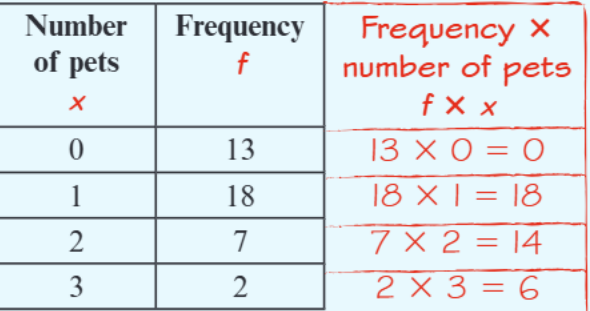
Looking at the pet ownership data:
- 0 pets: frequency = 13
- 1 pet: frequency = 18 (highest)
- 2 pets: frequency = 7
- 3 pets: frequency = 2
Since 1 pet has the highest frequency (18), the mode is 1 pet.
Calculating the range
The range shows how spread out the data is. Calculate it by subtracting the smallest value from the largest value.
Using the pet ownership data:
Working out the median
The median is the middle value when all data points are arranged in order. For frequency tables, follow these steps:
- Find the total number of data points by adding all frequencies
- The median position is at , where is the total frequency
- Count through the frequencies to find which value is at this position
Example
Worked Example: Finding the Median
For the pet ownership data:
Step 1: Calculate total frequency Total frequency = people
Step 2: Find median position Median position = This means the median lies between the 20th and 21st values.
Step 3: Locate the position
- Values 1-13: 0 pets
- Values 14-31: 1 pet (includes both 20th and 21st positions)
Since both the 20th and 21st values are 1 pet, the median is 1 pet.
Calculating the mean from frequency tables
The mean requires special care with frequency tables. You cannot just add the values and divide - you must account for how often each value occurs.
Step-by-step method:
- Create an extra column headed "frequency × value"
- Multiply each value by its frequency
- Add up all the values to get the total
- Divide this total by the sum of all frequencies
Note
Formula for Mean from Frequency Tables:
Example
Worked Example: Calculating the Mean
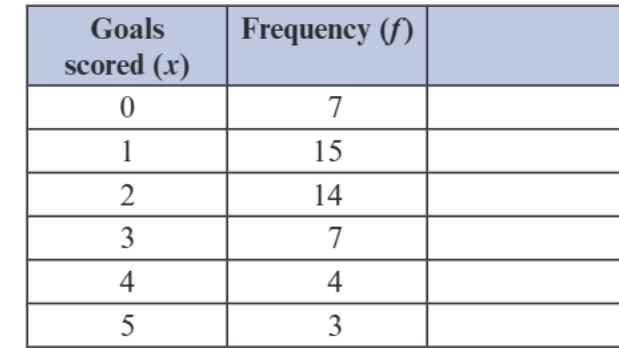
For the goals scored data:
Step 1: Create the column
Step 2: Calculate totals Total of column: Total frequency:
Step 3: Apply the formula Mean = goals
Important
Critical Points for Exam Success:
- Always create the column when calculating the mean
- Do not round your final answer unless specifically asked
- Check your arithmetic carefully - it's easy to make errors with multiple calculations
- Remember that frequency tells you how many, not what the value is
- Show your working clearly for full marks
Important
Common Mistakes to Avoid:
- Using frequency values as data values in calculations
- Forgetting to create the column for mean calculations
- Rounding too early in calculations
- Mixing up mode (most frequent) with median (middle value)
- Confusing the frequency with the actual data values
Summary
Key Points to Remember:
- Mode = value with the highest frequency
- Range = highest value - lowest value
- Median = middle value when data is in order
- Mean from frequency tables =
- Always create the column when finding the mean from a frequency table