Sequencing and Scheduling (HSC SSCE Business Studies): Revision Notes
📚Revision Notes
Sequencing and Scheduling
Introduction to sequencing and scheduling in operations
Operations managers need to coordinate multiple activities to transform inputs into outputs efficiently. Two critical tools help structure this transformation process: sequencing and scheduling. These planning tools allow managers to organize tasks logically, allocate time effectively, and monitor progress throughout the operations process.
Both sequencing and scheduling work together to create efficient workflows. Without proper sequencing, activities might occur in the wrong order, causing delays or inefficiencies. Without effective scheduling, tasks may take longer than necessary, wasting resources and missing deadlines. Operations managers use specialized tools to manage both aspects simultaneously.
Note
Sequencing and scheduling are complementary tools that must work together. Think of sequencing as the "what order" question and scheduling as the "how long" question—both are essential for effective operations management.
What is sequencing?
Sequencing determines the order in which operational activities must occur. Think of it as creating a roadmap that shows which tasks must be completed before others can begin.
In practice, sequencing involves:
- Identifying all necessary activities in the operations process
- Determining logical dependencies between activities
- Arranging activities in the most efficient order
- Recognizing which activities can occur simultaneously
- Establishing clear starting and finishing points
Important
Understanding Dependencies
You cannot perform tasks out of logical order. For example, when manufacturing a product, you cannot paint components before they are made. The sequencing ensures the making process comes before the painting process. Ignoring these logical dependencies leads to operational failure.
What is scheduling?
Scheduling focuses on the duration of activities within the operations process. It answers the question: "How long will each activity take?"
Effective scheduling requires managers to:
- Estimate realistic timeframes for each activity
- Consider resource availability and constraints
- Account for potential delays or complications
- Allocate sufficient time buffers between critical activities
- Monitor actual time taken versus planned time
Note
Scheduling turns a sequenced plan into a timetable. While sequencing tells you the order of activities, scheduling tells you when each activity starts and finishes.
Gantt charts: visual scheduling tool
What is a Gantt chart?
A Gantt chart is a type of bar chart that displays both scheduled and completed work over a specific time period. Created by engineer Henry Gantt in 1917, this tool remains fundamental in project management today.
Gantt charts provide three essential pieces of information:
- Activities that need to be performed
- Order in which activities should occur
- Duration (how long each activity takes)
How Gantt charts work
The structure of a Gantt chart is straightforward but powerful. The vertical axis lists all activities or tasks that must be completed. The horizontal axis represents time, typically divided into days, weeks, or months depending on the project scale.
Each activity is represented by a horizontal bar. The bar's position shows when the activity starts and ends. The length of the bar indicates the duration of that activity. As work progresses, the chart can be updated to show actual completion against planned completion.
Example: opening a retail clothing store
Example
Worked Example: Gantt Chart for "Stitched Up P/L" Clothing Store
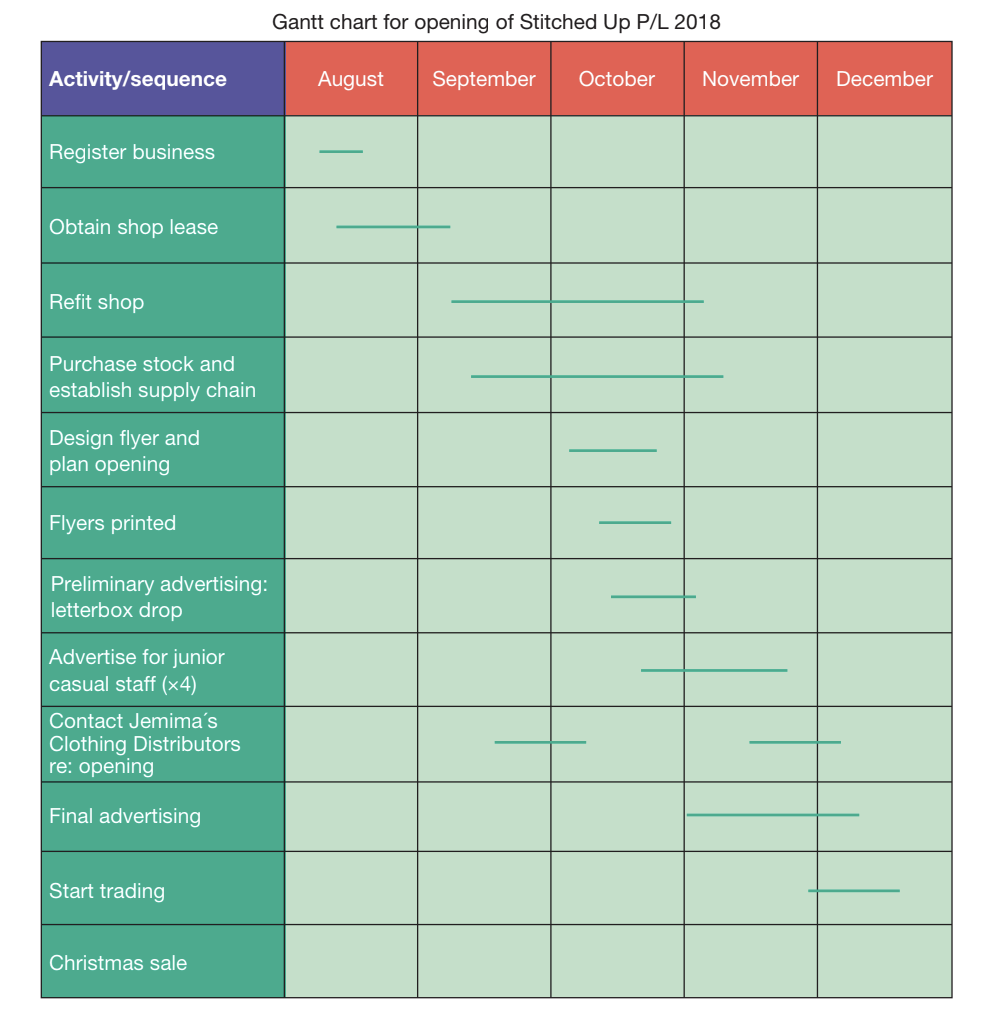
Consider a business opening a new clothing store called "Stitched Up P/L". The Gantt chart for this project would show activities such as:
- Registering the business (August)
- Obtaining the shop lease (August-September)
- Refitting the shop (September-November)
- Purchasing stock and establishing supply chains (September-November)
- Designing promotional flyers (October)
- Conducting advertising campaigns (October-December)
- Hiring casual staff (November)
- Starting trading (December)
The chart clearly shows that some activities must be completed before others begin (you cannot refit the shop before obtaining the lease), while other activities can occur simultaneously (advertising can happen while staff are being hired).
Advantages of using Gantt charts
Gantt charts offer two major benefits for operations management:
1. Forces comprehensive planning: Creating a Gantt chart requires managers to identify every step needed to complete a task. This detailed planning helps prevent important activities from being overlooked. Managers must also specify realistic timeframes for each task, which improves resource allocation and deadline setting.
2. Enables effective monitoring: Gantt charts make it easy to compare actual progress against planned activities. At any point, managers can see whether tasks are on schedule, ahead of schedule, or falling behind. This visual representation helps identify problems early, allowing corrective action before minor delays become major issues.
Applications of Gantt charts
Gantt charts are remarkably versatile. They can be used for:
- Simple routine tasks (like completing a homework assignment)
- Complex large-scale projects (like building infrastructure)
- Individual employee work schedules
- Team project coordination
Note
This flexibility makes Gantt charts valuable across all business sizes and industries, from small startups to multinational corporations.
Critical path analysis (CPA): optimizing scheduling
What is critical path analysis?
Critical path analysis (CPA) is a scheduling technique that identifies the sequence of essential activities that determines the minimum time needed to complete a project. Unlike Gantt charts, which primarily show timing, CPA focuses on identifying dependencies and the most time-efficient pathway through a project.
CPA shows:
- What tasks need to be completed
- How long each task takes
- What order is necessary to complete those tasks
- Which tasks can run simultaneously
- Which tasks are critical (cannot be delayed without delaying the entire project)
Understanding the critical path
The critical path represents the shortest possible time to complete all necessary tasks. This might seem counterintuitive, but in practice, the critical path is actually the longest sequence of dependent activities through the project.
Important
Why is the longest path the "shortest" time?
Because every activity on the critical path must be completed, and they must be done in sequence. Any delay to an activity on the critical path delays the entire project. Activities not on the critical path have some flexibility in timing without affecting the overall project completion date.
Working through a CPA example
Example
Worked Example: Manufacturing Electronic Switchgear Component
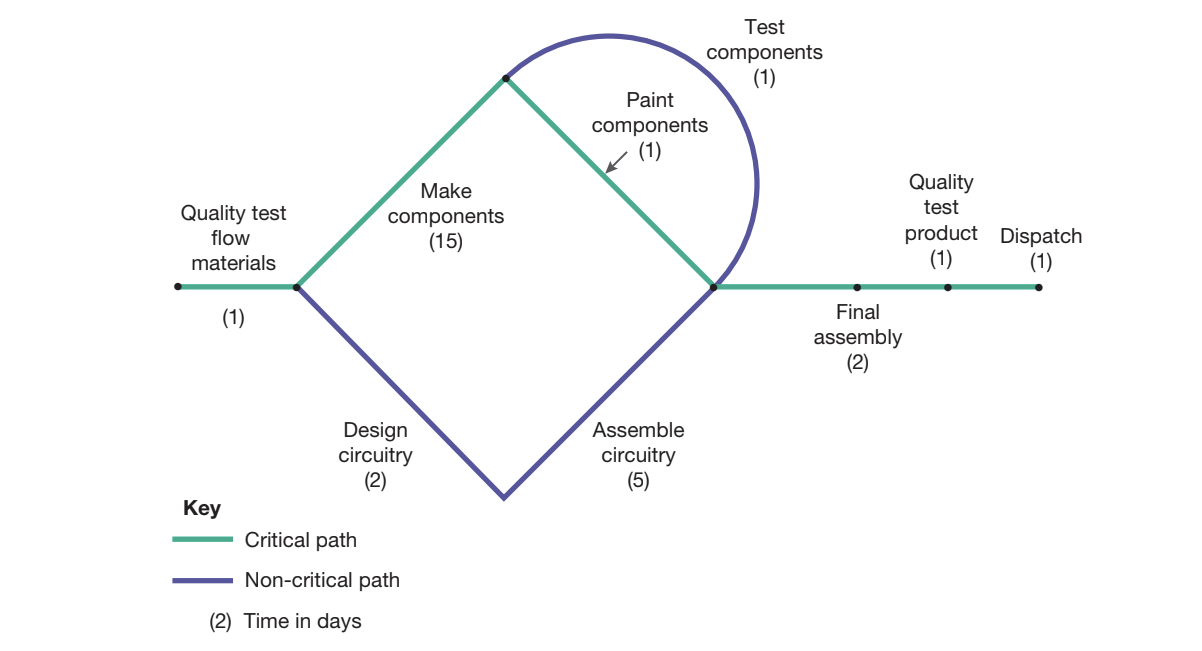
Consider manufacturing an electronic switchgear component. The process involves several activities:
Sequential Activities:
- Quality test raw materials (1 day)
- Make components (15 days)
- Paint components (1 day)
- Final assembly (2 days)
- Quality test finished product (1 day)
- Dispatch (1 day)
Simultaneous Activities:
- While components are being made (15 days), circuitry can be designed (2 days) and assembled (5 days)
- While components are being painted (1 day), they can also be tested (1 day)
Critical Path Calculation:
This represents: Quality test materials → Make components → Paint components → Final assembly → Quality test product → Dispatch.
Key Insight: The circuitry design and assembly ( days) happens during the 15 days of component making, so it doesn't extend the overall timeline. The critical path identifies that making components is the bottleneck activity—any delay here delays everything.
Why CPA is important: "You cannot take a shortcut"
Important
Understanding Non-Critical Paths
One crucial lesson from CPA is understanding why certain paths appear shorter but are not viable. In the switchgear example, the path through circuitry design and assembly appears to take only 12 days:
However, this path ignores the fact that making components takes 15 days by itself. You cannot complete the project without making components, so the minimum project duration is determined by the critical path of 21 days, not the non-critical path of 12 days.
The lesson: You cannot take a shortcut around critical path activities.
Benefits of critical path analysis
CPA provides several strategic advantages:
Direction and organization: CPA shows exactly what needs to be done and in what order, providing clear direction for the operations team.
Coordination: By identifying task dependencies, CPA enables better coordination between different teams or departments working on simultaneous activities.
Control mechanism: Managers can focus attention on critical path activities, knowing these are the ones that determine project completion. Activities not on the critical path have some scheduling flexibility.
Resource optimization: Understanding which tasks can occur simultaneously allows managers to allocate resources efficiently, potentially assigning multiple teams to work in parallel.
Risk identification: The critical path highlights where delays will have the greatest impact, allowing managers to allocate extra resources or attention to these high-risk activities.
Comparing Gantt charts and CPA
Both tools serve scheduling purposes but offer different perspectives:
Gantt charts excel at:
- Showing the overall project timeline visually
- Tracking progress against planned activities
- Communicating schedules to teams
- Managing multiple small projects simultaneously
Critical path analysis excels at:
- Identifying the most time-efficient sequence of activities
- Highlighting critical activities that cannot be delayed
- Recognizing opportunities for simultaneous task completion
- Optimizing resource allocation for minimum project duration
Note
Using Both Tools Together
In practice, operations managers often use both tools together. CPA helps determine the optimal sequence and identify the critical path, while Gantt charts provide a visual way to communicate the schedule and track progress. The combination provides both analytical depth and practical usability.
Exam guidance: analyzing scheduling tools
Important
Exam Strategy for Sequencing and Scheduling Questions
When answering exam questions about sequencing and scheduling:
For "describe" questions:
- Define the key term clearly (Gantt chart or CPA)
- Explain what information the tool provides
- State the purpose of using the tool
For "explain" questions:
- Describe how the tool works in practice
- Give a specific example
- Explain the benefits the tool provides to operations managers
For "analyse" questions:
- Compare advantages and disadvantages
- Consider different scenarios where each tool is most appropriate
- Link to broader operations management concepts like efficiency and quality
For "evaluate" questions:
- Assess the effectiveness of the tool in specific business contexts
- Consider limitations as well as benefits
- Make a judgment about when the tool is most valuable
- Support your argument with examples
When interpreting a Gantt chart or CPA diagram in an exam, always identify:
- The sequence of activities
- The duration of each activity
- Any activities that can occur simultaneously
- The total project duration
- (For CPA) The critical path and why it's critical
Remember!
Summary
Key Points to Remember:
-
Sequencing determines the order activities occur, while scheduling determines how long activities take—both are essential for effective operations management
-
Gantt charts are bar charts showing scheduled and completed work over time, making them excellent for planning tasks and monitoring progress against plans
-
Critical path analysis (CPA) identifies the sequence of essential activities determining minimum project duration, with the critical path being the longest necessary sequence through the project
-
Some activities can run simultaneously, which CPA helps identify for resource optimization, while the critical path shows activities that cannot be delayed without extending the overall project
-
Both tools provide direction, coordination, and control for operations processes, helping managers allocate resources efficiently and identify potential delays before they become critical problems
Key terms: Sequencing, scheduling, Gantt chart, critical path analysis (CPA), critical path, simultaneous tasks, operations process, transformation process