Forward and Backward Scanning (HSC SSCE Mathematics Standard): Revision Notes
📚Revision Notes
Forward and Backward Scanning
Introduction
In critical path analysis, we need to determine two important pieces of information for each activity in a project:
- When each activity can earliest begin
- When each activity must latest begin to avoid delaying the project
These are calculated using forward scanning and backward scanning respectively. Understanding both techniques helps us plan projects efficiently and identify which activities have flexibility in their scheduling.
Note
Both forward and backward scanning work together to give us a complete picture of project scheduling. Forward scanning identifies the minimum project duration, while backward scanning reveals which activities have scheduling flexibility.
Forward scanning
What is earliest starting time (EST)?
The earliest starting time (EST) is the earliest time any activity can begin after all prior activities have been completed.
For example, an means an activity cannot start until time units (such as hours or days) after the project begins.
Key points about EST:
- Activities that start the project have an (no prior activities)
- Activities that depend on others have an
- The EST at the project finish gives us the minimum time needed to complete the entire project
The forward scanning method
Forward scanning is the process we use to calculate the EST for each activity. We work systematically from the start of the project toward the finish, moving forward through the network diagram.
Step-by-step process:
Step 1: Draw a box split into two cells next to each vertex in your network diagram. If multiple activities begin at a vertex, draw a box for each activity.
Step 2: For activities that start the project (no predecessors), write in the left cell. This represents .
Step 3: For each subsequent activity, calculate its EST by adding:
Step 4: If an activity has multiple predecessors, calculate the EST using each predecessor separately, then choose the largest value. This ensures all prerequisite activities are complete before the activity begins.
Step 5: The EST value at the finish vertex represents the minimum completion time for the entire project.
Important
Critical Rule for Multiple Predecessors:
When an activity has more than one predecessor, you must calculate the EST using each predecessor separately and then choose the largest value. This is because all predecessor activities must be completed before the activity can begin, so we need to wait for the longest path to finish.
Worked example: Forward scanning
Let's work through a complete example to see forward scanning in action.
Example
Worked Example: Forward Scanning
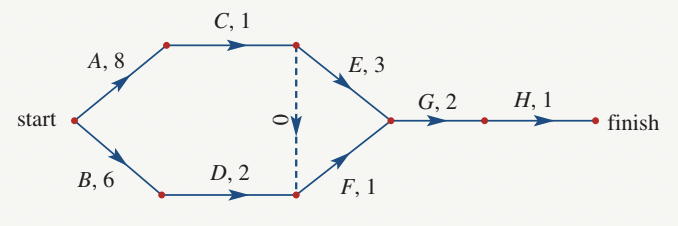
Question: Find the earliest starting time (EST) for the project shown in the network diagram. Activity durations are in days.
Solution:
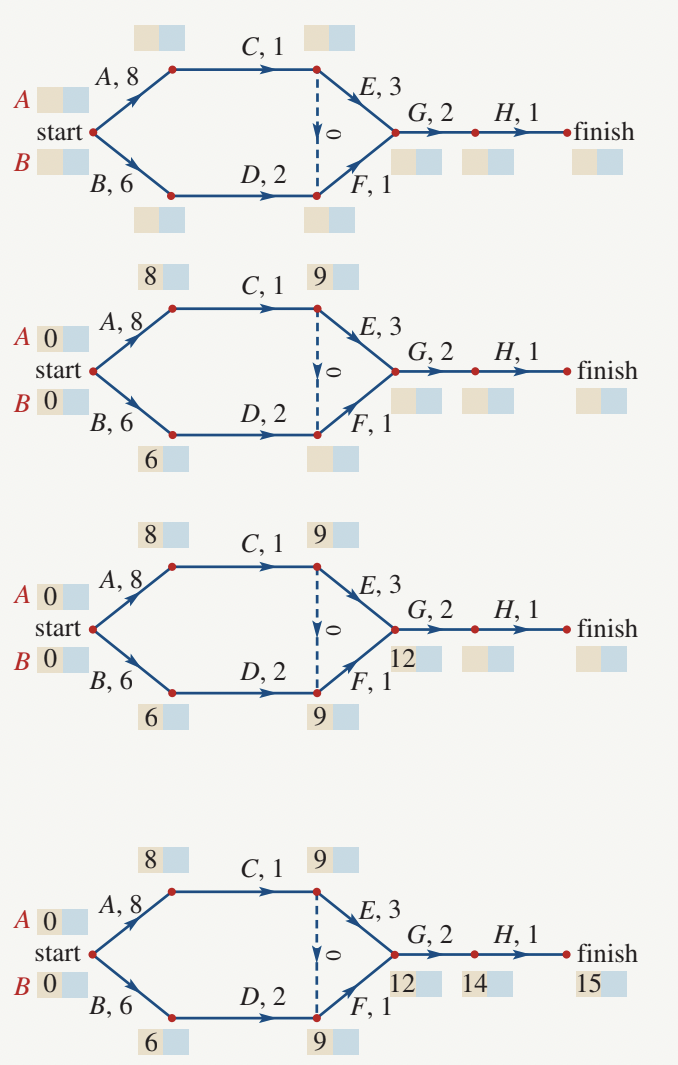
We follow the forward scanning steps systematically:
- Draw boxes at each vertex (shown in the diagrams above)
- Activities and start the project, so both have
- Activity follows activity (duration days):
- Continue for each activity. Notice the special cases:
- Activity has two predecessors:
- Via activity :
- Via activity :
- We choose the larger value:
- Activity has two predecessors:
- Activity also has two predecessors:
- Via activity :
- Via activity :
- We choose the larger value:
- At the finish, we find
Answer: The earliest starting time of the project is 15 days. This is the minimum time required to complete the entire project.
Note
Why choose the largest EST?
When an activity has multiple predecessors, all of them must be completed before the activity can begin. Taking the largest EST ensures we wait for the longest path to complete. If we took a smaller EST, we might try to start the activity before all its prerequisites are finished, which is impossible in practice.
Backward scanning
What is latest starting time (LST)?
The latest starting time (LST) is the latest time an activity can start without delaying the entire project, assuming all prior activities have been completed.
Certain activities have flexibility in their scheduling—they don't need to start at their earliest possible time. The LST tells us how late we can afford to start each activity while still completing the project in minimum time.
Note
Understanding LST is crucial for project management because it reveals which activities have "slack time" or flexibility. Some activities must start precisely at their EST (these are on the critical path), while others can be delayed without impacting the overall project completion time.
The backward scanning method
Backward scanning is the reverse of forward scanning. We calculate LSTs by working from the project finish back toward the start, moving backward through the network diagram.
Step-by-step process:
Step 1: Use your network diagram with EST values already calculated from forward scanning.
Step 2: Copy the minimum completion time (the EST at finish) into the right cell of the box at the finish vertex.
Step 3: For each activity, calculate its LST by subtracting:
Step 4: If multiple activities share the same predecessor, calculate the LST using each following activity separately, then choose the smallest value. This ensures the activity finishes in time for all its successors to start when needed.
Step 5: Continue backward through the network until all LST values are calculated.
Important
Critical Rule for Multiple Successors:
When an activity has multiple successors, you must calculate the LST using each following activity separately and then choose the smallest value. This is because the activity must finish early enough for all its successor activities to start on time, so we need to accommodate the most time-critical successor.
Worked example: Backward scanning
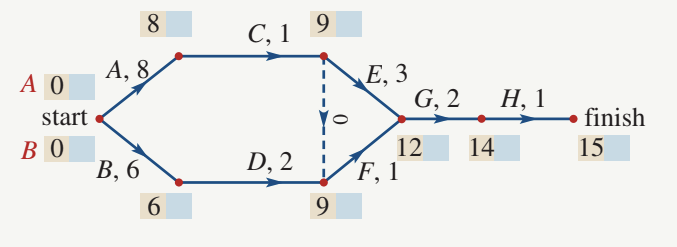
We'll use the same network diagram from the forward scanning example.
Example
Worked Example: Backward Scanning
Question: Find the latest starting time (LST) for each activity. Activity durations are in days.
Solution:
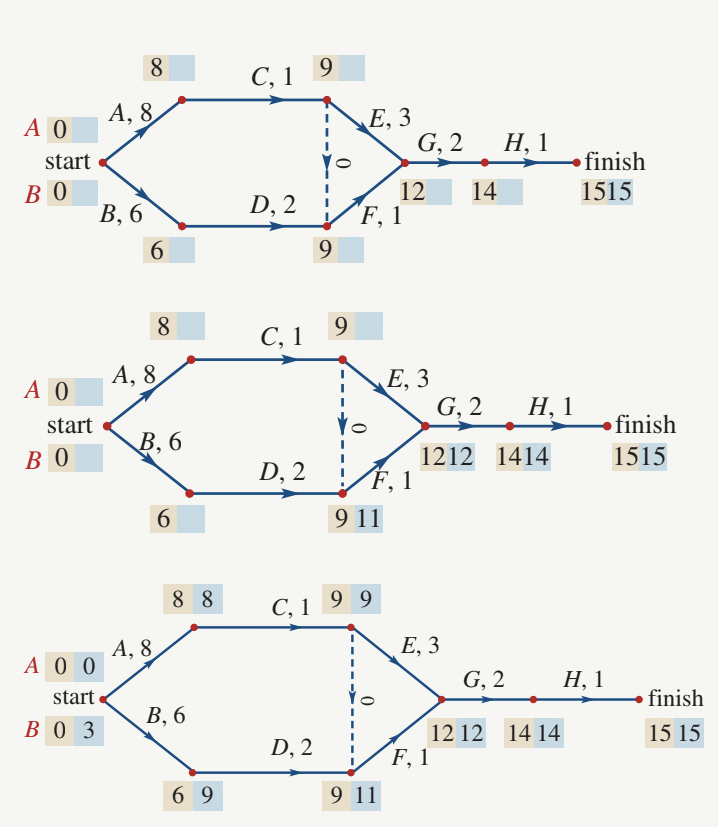
Starting with our completed forward scanning:
- Copy the minimum completion time () into the right cell at the finish vertex:
- Work backwards:
- Activity :
- Activity :
- For activities with multiple successors, calculate each path:
- Activity :
- Path via :
- This is the only path, so
- Activity :
- Path via :
- Path via :
- Choose the smaller value:
- Activity :
- Continue backward to the start:
-
Activity : Since it leads to ,
-
Activity : Through its path,
-
Note
Why choose the smallest LST?
When an activity has multiple successors, it must finish early enough for all of them to start on time. Taking the smallest LST ensures the activity completes before the most time-critical successor needs to begin. Choosing a larger LST could delay critical successors and extend the entire project duration.
Comparing EST and LST
The table below highlights the key differences between forward and backward scanning:
| Earliest Starting Time (EST) | Latest Starting Time (LST) |
|---|---|
| The earliest time any activity can start after all prior activities are complete | The latest time any activity can start without delaying the project |
| Calculated using forward scanning | Calculated using backward scanning |
| Start from the beginning and work forward | Start from the end and work backward |
| if no prior activities | LST at finish equals the minimum completion time |
| With multiple predecessors: choose the largest EST | With multiple successors: choose the smallest LST |
| Formula: | Formula: |
Note
The difference between an activity's LST and EST represents its float or slack time—the amount of scheduling flexibility that activity has. Activities where are on the critical path and have no flexibility.
Exam tips
- Always complete forward scanning before starting backward scanning
- Draw clear boxes at each vertex—label the left cell for EST and right cell for LST
- When activities have multiple predecessors or successors, write out all calculations to avoid mistakes
- Remember: forward scanning uses largest values, backward scanning uses smallest values
- The EST at the finish vertex always equals the LST at the finish vertex (both equal minimum completion time)
- Double-check your arithmetic—errors in early calculations affect all subsequent values
Important
A common mistake is confusing when to choose the largest versus smallest value. Remember this simple rule:
- Forward (EST): Add durations, choose LARGEST
- Backward (LST): Subtract durations, choose SMALLEST
Remember!
Summary
Key Points to Remember:
- Forward scanning calculates the earliest starting times (EST) by working from start to finish through the network
- Backward scanning calculates the latest starting times (LST) by working from finish to start through the network
- With multiple predecessors: add durations and choose the largest EST (all predecessors must complete)
- With multiple successors: subtract durations and choose the smallest LST (must finish before earliest successor)
- The EST at the project finish gives the minimum completion time for the entire project
- Always complete forward scanning first, then use those values for backward scanning
- The difference between LST and EST for any activity represents its scheduling flexibility (float)