Networks (HSC SSCE Mathematics Standard): Revision Notes
📚Revision Notes
Networks
What is a network?
A network describes a group or system of interconnected objects. Networks appear throughout everyday life in many different forms. Cities connect through road systems, computers link via the internet, and people connect through social media friendships. Each of these situations involves connections between different objects or points.

Note
Networks are everywhere in our daily lives! From transportation systems to social connections, understanding networks helps us analyze and optimize complex systems of relationships and pathways.
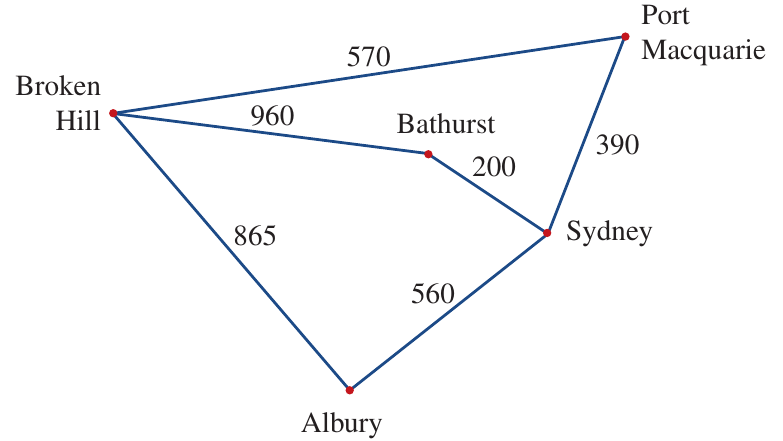
A network diagram (also called a graph) provides a visual way to represent these connections. It shows a group of objects called vertices that are connected by lines. In network diagrams, the lengths of the lines are typically not drawn to scale.
Key components of networks
Every network consists of fundamental building blocks that work together to create the complete structure. Understanding these components is essential for analyzing and working with any network.
Vertices (nodes)
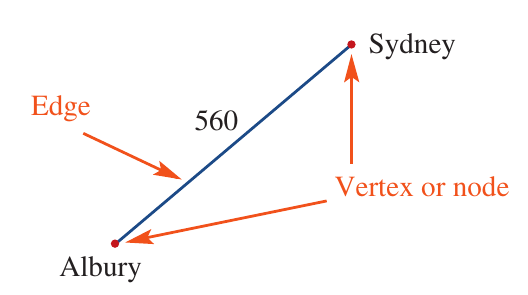
A vertex (plural: vertices) is a point or dot on a network diagram where pathways meet or branch. Vertices are also called nodes. In the diagram above showing NSW cities, each city name represents a vertex.
Edges
An edge is a line that connects two vertices. Edges show the pathways or connections between points in the network.
Important
An important property of edges is that they can cross each other without creating an intersection point (node) where they cross. The crossing point is not considered a vertex unless it's explicitly marked as one.
Degree of a vertex
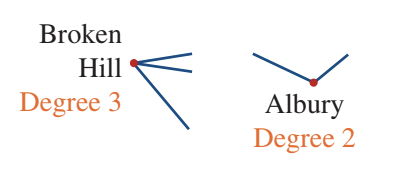
The degree of a vertex indicates how many edges meet at that vertex. You calculate the degree by counting the number of edges connected to the vertex.
For example, if Broken Hill connects to three other cities, we write:
The degree of any vertex will always be either even or odd:
Even degree: A vertex has even degree when an even number of edges connect to it. In the NSW cities network, Port Macquarie, Bathurst, and Albury all have even degree.
Odd degree: A vertex has odd degree when an odd number of edges connect to it. In the NSW cities network, Sydney and Broken Hill both have odd degree.
Note
The classification of degree as even or odd becomes particularly important when analyzing certain types of network problems, such as determining whether a path exists that traverses every edge exactly once.
Special features in networks
Networks can include several special features that add complexity and allow them to model more realistic situations.
Multiple edges
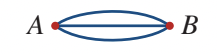
Networks can contain multiple edges connecting the same pair of vertices. This might represent different routes between two locations or multiple connections between the same two objects.
Loops
A loop is a special type of edge that starts and ends at the same vertex.

Important
While a loop counts as just one edge, it contributes to the degree of that vertex. This is because the loop connects to the vertex at both its start and end points.
Weighted edges
A weighted edge has a number assigned to it representing some numerical value. This value might show distance, cost, time, or any other measurable quantity.
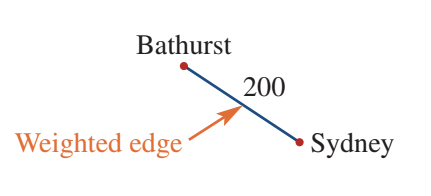
The diagram above shows a weighted edge between Bathurst and Sydney, with the number indicating the distance of 200 kilometres between these cities.
Types of networks
Networks can be classified into different types based on how travel or movement is permitted along their edges.
Directed networks
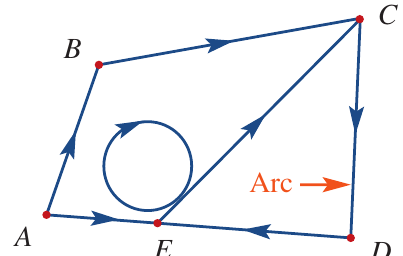
A directed edge (also called an arc) includes an arrow showing that travel is only permitted in the direction of the arrow. An undirected edge has no arrow, allowing travel in both directions.
In a directed network or directed graph, all edges are directed. The example above shows a directed network with five vertices and six arcs. You could travel from to to , but there would be no path available to return from to to .
Undirected networks
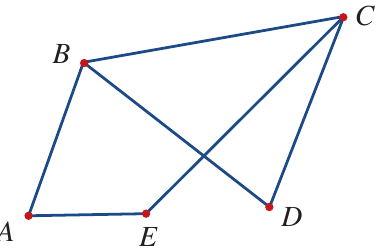
In an undirected network or undirected graph, all edges are undirected, meaning travel is possible in both directions along any edge. The diagram above shows an undirected graph with five vertices and six edges. This allows paths in both directions, so you can travel from to and also from to .
Note
Key Difference: In directed networks, arrows restrict movement to one direction only, while undirected networks allow two-way travel along all edges. This distinction is crucial when modeling real-world scenarios like one-way streets versus two-way roads.
Simple networks
A simple network contains no multiple edges and no loops. It represents the most basic type of network structure.
Labelling networks
Beyond drawing network diagrams, we can describe networks precisely using mathematical notation. This allows us to communicate network structures clearly and unambiguously.
Labelling vertices
Beyond simply marking vertices on a diagram, we can list all vertices using set notation with curly brackets. For a network with vertices , , , , and , we write:
The symbol V represents the set of all vertices in the network.
Labelling edges
We label edges using ordered pairs of vertices. An edge connecting vertex to vertex is written as . A loop at vertex is written as .
For a complete network, we can list all edges. For example:
The symbol E represents the complete list of all edges in the network.
Worked example: Identifying network properties
Example
Worked Example: Analyzing Network Properties
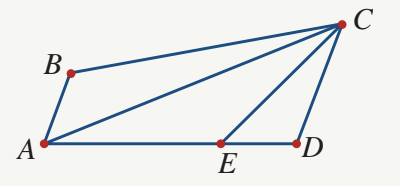
Question: For the network shown, find the:
- Number of vertices
- Number of edges
- Degree of vertex
- Number of vertices of odd degree
Solution:
a) Number of vertices
Count each dot in the network diagram.
Answer: Five vertices
b) Number of edges
Count each line in the network diagram.
Answer: Seven edges
c) Degree of vertex
Count how many edges meet at vertex .
Answer:
d) Number of vertices of odd degree
First, count the edges meeting at each vertex:
- Vertex : 3 edges
- Vertex : 2 edges
- Vertex : 4 edges
- Vertex : 2 edges
- Vertex : 3 edges
List the vertices with an odd number of edges: and
Answer: Two vertices of odd degree
Remember!
Summary
Key Points to Remember:
-
A network is a system of interconnected objects represented by vertices and edges showing pathways between them.
-
Vertices (or nodes) are the points where connections meet, while edges are the lines connecting vertices.
-
The degree of a vertex equals the number of edges meeting at that vertex, and can be classified as even or odd.
-
Loops connect a vertex to itself and add to the vertex's degree despite counting as only one edge.
-
Directed networks use arrows to show one-way travel (arcs), while undirected networks allow travel in both directions.
-
Weighted edges display numerical values such as distances, costs, or times between vertices.