The Binary Number System (AQA A-Level Computer Science): Revision Notes
📚Revision Notes
The Binary Number System
Introduction
Computers process all data in binary form. While humans naturally work with decimal numbers (base 10), computers can only understand binary (base 2). As computing students, understanding how binary works and how computers perform calculations in binary is fundamental to understanding how computers operate at a low level.
Note
The term "binary" comes from "bi-" meaning two, referring to the two digits (0 and 1) used in this number system. Similarly, "decimal" comes from "deci-" meaning ten, referring to the ten digits (0-9) we use in everyday counting.
This note covers binary arithmetic operations, different methods for representing various types of numbers (positive, negative, and fractional), and the limitations and considerations when working with binary representations.
Unsigned binary arithmetic
When we refer to unsigned binary, we mean binary numbers that represent positive values only. This is the simplest form of binary representation.
Adding unsigned binary integers
Binary addition follows similar principles to decimal addition. You line up the numbers in columns and add from right to left, carrying values across to the next column when needed.
Important
Binary Addition Rules - Memorize These:
- (write 0, no carry)
- or (write 1, no carry)
- (write 0, carry 1)
- (write 1, carry 1)
Remember, in binary you only have two digits available: 0 and 1. When adding two 1s together, the result is 10 in binary, which equals 2 in decimal.
Example
Worked Example: Adding Binary Numbers
To add and :
  00110010
+ 10110101
-----------
  11100111
        11
Starting from the rightmost column (the LSB):
- (write 1)
- (write 1)
- (write 1)
- (write 0)
- (write 0, carry 1)
- (carry) (write 0, carry 1)
- (carry) (write 0, carry 1)
- (carry) (write 1, carry 1)
Verification: Convert to decimal to check:
- First number:
- Second number:
- Result:
- Check: ✓
For comparison, here's how decimal addition looks:
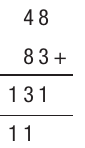
Note
Always verify your binary addition by converting all numbers to decimal and checking the calculation. This helps catch errors and builds confidence in your binary arithmetic skills.
Multiplying unsigned binary integers
Binary multiplication works similarly to decimal multiplication. You multiply the first number by each digit of the second number in turn, starting from the right. Since binary only has 0s and 1s, you're essentially multiplying each digit by either 0 (giving 0) or 1 (giving a copy of the number).
As with decimal multiplication, you shift your answers to the left as you work through each digit. This shifting is important as it creates the correct place values.
Example
Worked Example: Multiplying Binary Numbers
Multiplying by :
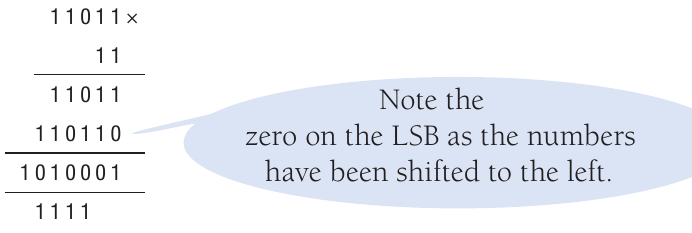
The process:
- Multiply by 1 (the rightmost digit)
- Multiply by 1 (the next digit left) , but shifted one position left
- Add these partial products together using binary addition
Notice the zero on the LSB (Least Significant Bit) created by the left-shifting operation.
Verification: Convert to decimal:
- First number:
- Second number:
- Result:
- Check: ✓
Types of numbers
In computing, it's essential to distinguish between different types of numbers. So far, we've only examined integers, which are whole numbers. More specifically, we've looked at unsigned integers, meaning all values have been positive.
However, computers must also handle:
- Real numbers (positive and negative numbers with decimal places)
- Very large numbers
- Very small numbers requiring high precision
Note
Many computer applications require these capabilities. For example:
- Scientific calculations may need extremely large or small values
- Financial systems need precise decimal handling
- Graphics processing requires both positive and negative coordinates
Two's complement
Two's complement is the standard method used to represent signed integers (both positive and negative numbers) in binary form. This approach is similar to methods covered in earlier chapters and builds on that foundation.
Understanding two's complement
In two's complement representation, the Most Significant Bit (MSB) becomes negative. This means the leftmost bit indicates whether the number is positive or negative.
Here's how an 8-bit two's complement number is structured:

The place values are:
Important
Notice that the MSB has a value of rather than .
- When the MSB is 1, it indicates the number is negative
- When the MSB is 0, it indicates the number is positive
With 8 bits, two's complement can represent 256 different numbers, ranging from to .
For any n-bit two's complement system:
For 8 bits specifically:
Converting positive numbers to two's complement
Example
Worked Example: Representing Positive Numbers
For the number :

Binary:
Calculation: ✓
The MSB is 0, confirming this is a positive number.
Converting negative numbers to two's complement
Important
Two's Complement Conversion Method:
To convert a positive number to its negative equivalent:
- Write out the binary equivalent of the positive number
- Starting at the LSB, copy each bit until you reach the first 1 (including that 1)
- Reverse all the remaining bits (, )
This method is sometimes called "find the first 1, flip the rest."
Example
Worked Example: Converting to Negative
Let's convert to two's complement:
Start with :
Step 1: Starting from the right, write out the number until the first 1:
- LSB is 0, copy it
- Next bit is 1, copy it - this is our first 1, so stop here
Step 2: Reverse all remaining bits:
- 0 becomes 1
- 1 becomes 0
- 1 becomes 0
- 0 becomes 1
- 0 becomes 1
- 1 becomes 0
Result:

Verification: ✓
Let's look at another example showing :

Adding and subtracting using two's complement
Adding numbers using two's complement follows the same process as decimal addition: add the columns from right to left, carrying values across as needed.
For example, to add and in decimal:
Binary addition works identically.
Example
Worked Example: Binary Addition with Two's Complement
To add to :
  01101100
+ 10001000
-----------
  11110100
         1
Remember: and in binary.
Important
Key Concept: Subtraction in Computers
Computers can only perform addition. To subtract, they convert the number to be subtracted into a negative number using two's complement, then add.
Example
Worked Example: Subtraction Using Two's Complement
To calculate :
- Calculate the binary equivalent of 20:
- Calculate the binary equivalent of :
- Add them together:
  00010100
+ 11110011
-----------
  00000111
       111
The final carry bit is an overflow bit, which is handled separately.
The result equals ✓
Fixed point numbers
To represent real numbers (numbers with fractional parts), we can use fixed point representation. The binary point works like a decimal point but in binary.
The binary point's position is fixed by the programmer (it's not actually stored in the code). For example, with an 8-bit code, you might place the binary point after the fourth bit:

Understanding fractional place values
Just as bits before the binary point represent powers of 2 (), the bits after represent negative powers of 2 (fractions):

The place values after the binary point are: ½, ¼, ⅛, 1/16, and so on.
Converting fixed point binary to decimal
Example
Worked Example: Converting Fixed Point to Decimal
The conversion process is the same as before, but now the bits after the binary point become fractions.
Example with the binary number shown above where the point is after the fourth bit:
Calculation: or ✓
Limitations of fixed point
Important
Critical Understanding: Trade-offs in Fixed Point
The position of the binary point affects both the range and accuracy of numbers you can represent:
- The smallest number (apart from 0) is which equals or
- The next representable number is which equals or
- You cannot represent any number between 0.0625 and 0.125
- The largest number is which equals or
The Trade-off:
- Moving the binary point left allows more accurate decimals but reduces the range of whole numbers
- Moving it right increases the range of whole numbers but reduces accuracy
- With an 8-bit code, you always have exactly 256 different combinations, regardless of where the binary point is positioned
Negative numbers with fixed point
Fixed point can also represent negative numbers using two's complement:

Example
Worked Example: Negative Fixed Point
This number would be calculated as:
or ✓
Floating point numbers (A level only)
The problem with fixed and 8-bit systems
The major limitation of 8-bit systems is their restricted range. The biggest positive number in an 8-bit unsigned system is only , and the smallest positive number with a fixed point is . Many programs need to handle much larger or smaller values than this.
Note
There are two solutions to extend the range:
- Allocate more bits to store numbers (e.g., 16-bit allows to ; 24-bit allows to )
- Use floating point representation
What is floating point?
In floating point representation, the binary point can move (or "float") within the number. This is similar to scientific notation in decimal. For instance, on a calculator, the number might display as , where:
- is the mantissa (the significant digits)
- is the exponent (indicating the decimal point moves 11 places right)
Structure of floating point numbers
A floating point number consists of two parts:
- Mantissa: the significant digits that make up the number
- Exponent: the "power" part indicating how far the binary point should be shifted
Here's an example structure:

Important
Both the mantissa and exponent can use two's complement, allowing representation of negative values in each part.
Converting decimal to floating point
Example
Worked Example: Converting Decimal to Floating Point
Let's work through converting to floating point.
Step 1: Convert to fixed point representation first.
Using 8 bits with the binary point after the fourth bit:

Calculation: ✓
Step 2: Normalise the number.
For a positive number, the normalised form must start with 01 (reading from left after the binary point). This means we need to move the binary point three places to the left:
Step 3: Use the exponent to record how far we moved the point.
We moved the binary point three places back to the right, so the exponent is .
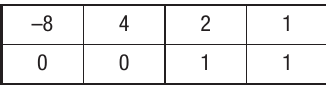
Calculating the exponent in binary: in 4-bit two's complement is .
Step 4: Combine mantissa and exponent.

For this example, we used a 6-bit mantissa and a 2-bit exponent to represent .
Converting floating point to decimal
Example
Worked Example: Converting Floating Point to Decimal
To convert back, work through the process in reverse.
Given mantissa and exponent :
Step 1: Calculate the exponent value.
The exponent is , meaning the binary point moves three places right.
Step 2: Calculate the mantissa value with the adjusted binary point.
Original mantissa with binary point:
After moving three places right:
Calculation: ✓
Example with a negative number
Example
Worked Example: Negative Number in Floating Point
Let's convert to floating point.
Step 1: Convert to fixed point.

Starting value:
Step 2: Convert to negative using two's complement.
Starting at the LSB, copy until the first 1:
Reverse remaining bits:

Step 3: Normalise for a negative number (must start with 10 after binary point).
Move the binary point four places left:
Step 4: Record the exponent.
We need to move four places back to the right, so exponent .

The normalised representation uses an 8-bit mantissa and a 3-bit exponent.
Advantages of different bit allocations
Note
Effect of Bit Allocation:
-
Increasing the number of bits in the exponent allows the floating point to move further, extending the range of representable values. For example, a 3-bit exponent would allow the binary point to move up to six places.
-
Increasing the number of bits in the mantissa increases both the accuracy and range of values.
For an 8-bit mantissa and 4-bit exponent with two's complement:
- Mantissa range: to
- Exponent range: to
Fixed point compared to floating point
Summary
Advantages of Floating Point:
- Much wider range of numbers can be represented with the same number of bits
- Particularly suited to applications where values may vary greatly in magnitude
- Essential for scientific calculations requiring very large or very small numbers
Advantages of Fixed Point:
- Values processed exactly as integers, allowing use of standard integer hardware
- Processing is faster since no binary point adjustment is needed
- Absolute error remains constant, maintaining precision within a limited range
- Suited to applications requiring speed (e.g., gaming, digital signal processing)
- Suited to applications requiring absolute precision (e.g., currency calculations)
Underflow and overflow
When using signed binary, calculations can sometimes generate numbers too large or too small for the allocated bits.
Overflow occurs when a number is too large to be represented with the available bits. Underflow occurs when a number is too small.
Understanding overflow
The MSB indicates whether a number is positive (0) or negative (1). Using 8-bit two's complement, we can represent to . What happens if a calculation produces ?
Example
Worked Example: Overflow with Addition
If we added (1 in decimal) to (127 in decimal), the result would be :

In two's complement, this represents -128, not +128. The MSB being 1 indicates a negative number.
Another example: Adding should give . In binary with 8 bits:

Binary: , which in two's complement equals (not 153).

Overflow causes the computer to produce an incorrect result.
Understanding underflow
Underflow occurs when a number is too small to represent with the allocated bits.
Example
Worked Example: Underflow with Fixed Point
With 6 bits and a fixed point, the smallest representable number is or :
If a calculation produced a value like or , it would create an underflow error, as this value cannot be represented.
Consequences of overflow and underflow
Important
Critical: Error Handling
Both overflow and underflow can cause serious problems in programs, potentially generating erroneous results or causing crashes.
Common methods for handling these issues include:
- Using flags to indicate when overflow or underflow occurs
- Carrying additional bits (like carrying digits in decimal addition)
- Representing overflow as infinity ()
Normalisation and precision
What is normalisation?
Normalisation is a technique ensuring numbers are represented as precisely as possible in relation to the bits being used. Another benefit is that normalisation ensures only one representation of each number is possible.
Note
Think of normalisation as choosing how many decimal places to use when representing a decimal number. For instance, to record athletics race times, you'd want an appropriate number of decimal places for precision.
Consider recording 100m, 400m, and 1500m race times with six digits:
- 100m winner: s (four decimal places provides precision)
- 400m winner: s (four decimal places)
- 1500m winner: s (three decimal places, as three digits needed for the integer part)
The decimal point "floats" to provide the best precision for each value.
Normalisation with mantissa and exponent
With a fixed number of bits for the mantissa, the precision can be affected by where the binary point is positioned. The exponent ensures the floating point is placed to optimise precision.
For example, can be represented as:
The second option () is optimal as it uses the fewest digits while providing a precise result. This is the "normal form" or "normalised" representation.
Normalisation rules for binary
Important
Normalisation Rules for Binary Codes:
For binary codes, normalisation requires:
- The first bit of the mantissa after the binary point must be 1 for positive numbers or 0 for negative numbers
- The bit before the binary point must be the opposite
In other words:
- Normalised positive floating point numbers must start with 01
- Normalised negative floating point numbers must start with 10
Example
Worked Example: Normalising a Positive Number
To represent in decimal:
Original:
Step 1: Convert to normalised mantissa starting with 01:
Step 2: The binary point moved seven places right, so exponent
Step 3: Express exponent in two's complement:
Step 4: Complete representation:
Therefore, the normalised representation of is (mantissa , exponent ).
Why normalisation matters
An 8-bit mantissa and 4-bit exponent allow a much wider range of positive and negative numbers than using eight bits alone.
For example, with 8 bits and a fixed point:
- Lowest positive value: or
- Highest value:
With floating point (8-bit mantissa, 4-bit exponent) using two's complement:
- Mantissa range: to
- Exponent range: to
This dramatically extends the representable range while maintaining precision.
Rounding errors
When working with decimal numbers, we're familiar with rounding. For example, in decimal is (recurring). We typically represent this as or , knowing there's some error in the calculation.
A similar phenomenon occurs with binary representation. If you try converting in decimal to binary, you'll find it produces a recurring pattern that cannot be exactly represented. If you try to represent with 8 bits and a fixed point, you'll encounter limitations.
Example
Worked Example: Rounding Error in Binary
Attempting :

This gives .
Attempting :

This gives .
With 8 bits, the closest we can represent to is away. We could extend the number of bits to get closer to , but at some point, we must accept a level of imprecision.
Note
It's the programmer's responsibility to decide what constitutes an accurate enough number and allocate an appropriate number of bits to achieve the required level of precision.
Absolute and relative errors
There are two main methods for calculating the degree of error in numbers used within programs.
Absolute error
The absolute error is the actual mathematical difference between the true answer and the approximation stored. For example, if a calculation requires 8 decimal places but we only allocate 8 digits, we might need to round or truncate.
Example
Worked Example: Calculating Absolute Error
If the true value is but we store , the absolute error is:
Note that absolute error is always expressed as a positive value.
You can apply a margin of error when deciding whether a number is sufficiently accurate. For instance, you might decide is an acceptable margin.
Note
Context Matters:
For numbers around 1, this degree of accuracy is probably sufficient. However:
- If storing a very large number like , you probably wouldn't need eight decimal places anyway - perhaps one or two would suffice
- For very small numbers (e.g., microscopic measurements), you might need many more decimal places
Relative error
Rather than applying a rigid margin, relative error considers the value being stored and applies a proportional margin. You compare the actual result to the expected result and decide on a relative margin.
For example, you might decide that is sufficient. This means for numbers in the thousands, no decimal places are needed (you could store as an integer). For very small numbers, you might need to allocate 10 decimal places with no whole number component.
Important
Formula for Relative Error:
Example
Worked Example: Calculating Relative Error
If trying to represent using floating point with an 8-bit mantissa and a 3-bit exponent, it might be stored as :
- Mantissa: (with binary point moved)
- Exponent: (meaning , move point three places right)
After conversion, this equals .
Absolute error
Relative error (approximately )
This calculation helps determine whether the precision is acceptable for the intended use.
Remember!
Summary
Key Points to Remember:
- Binary addition follows the same column method as decimal, but remember: (write 0, carry 1)
- Binary multiplication involves multiplying by each digit (0 or 1), shifting left, then adding the partial products
- Two's complement represents signed integers by making the MSB negative; range for n bits is to
- Fixed point has the binary point in a fixed position; bits after the point represent fractions (, , , etc.)
- Floating point consists of a mantissa (significant digits) and exponent (how far to shift the point), allowing a much wider range of values
- Normalisation ensures positive numbers start with 01 and negative numbers start with 10 (after binary point) for maximum precision
- Overflow occurs when a number is too large for the allocated bits; underflow when too small
- Relative error () is better than absolute error for comparing accuracy across different scales