Character Sets and Bits Per Character (AQA GCSE Computer Science): Revision Notes
📚Revision Notes
Character sets and bits per character
Understanding character encoding
When you type on a keyboard, your computer needs to understand what each key press means. This is where character encoding comes in - it's the system that converts the letters, numbers, and symbols you type into binary code that computers can process and store.
Think of character encoding like a translation dictionary. Each character you can type has a unique binary number assigned to it. When you press 'A', the computer looks up the binary code for 'A' and stores that code instead of the actual letter. This character code can then be used to display the character on screen or send it to a printer.
Note
Just like how a dictionary helps translate between languages, character encoding acts as a translator between human-readable text and the binary language that computers understand.
For computers to communicate properly, they need to agree on which binary codes represent which characters. This is why we have international standards for character encoding.
What is a character set?
A character set is like a complete list of all the characters that a computer system can understand and display. This includes everything from letters and numbers to punctuation marks and special symbols.
The size of a character set depends on how many bits are used to represent each character. More bits means more possible combinations, which means more characters can be included in the set. The first widely-used standard was designed for English text, but as computers became global, we needed much larger character sets to handle all the world's languages.
Important
Key Relationship: More bits per character = More possible combinations = Larger character set
This is why modern encoding systems use more bits than older ones - they need to represent characters from many different languages and symbol systems.
ASCII character encoding
In 1960, the American Standards Association created ASCII (American Standard Code for Information Interchange) to solve the problem of different computer systems using different codes for the same characters.
ASCII uses a 7-bit system, which means each character is represented by a 7-digit binary number. Since each bit can be either 0 or 1, this gives us possible characters.

The 128 ASCII characters are carefully organised into different categories:
- 52 letters (26 uppercase A-Z, 26 lowercase a-z)
- 10 digits (0-9)
- 33 punctuation marks and symbols (including the space character)
- 32 control characters (non-printable codes used for formatting)
ASCII code examples
Here are some common ASCII characters with their binary, hexadecimal, and decimal representations:
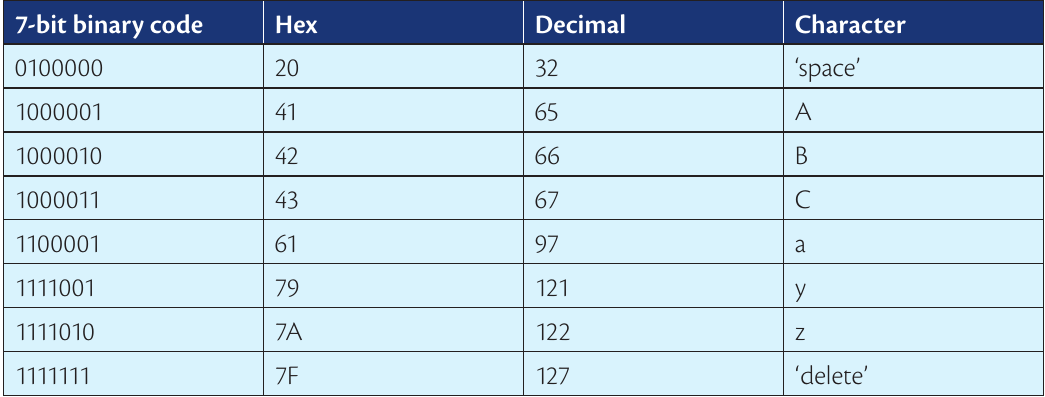
Example
Understanding ASCII Organisation:
Notice how the codes follow logical patterns:
- Uppercase letters: A=65, B=66, C=67 (sequential)
- Lowercase letters: a=97, b=98, c=99 (also sequential)
- Digits: 0=48, 1=49, 2=50 (following in sequence)
This organised structure makes it easy for programmers to convert between characters and their numerical codes using simple mathematical operations.
Important note about ASCII storage
While ASCII uses 7 bits to encode characters, computers actually store each ASCII character using 8 bits (1 byte). The extra bit was originally used for error-checking to ensure data wasn't corrupted during transmission. This means each ASCII character requires exactly 1 byte of storage space.
Important
For GCSE Calculations: You'll work with the standard 7-bit ASCII codes that represent the first 128 characters, but remember that storage allocation is typically 1 byte (8 bits) per character.
Unicode character encoding
As computers spread worldwide, ASCII's limitation became obvious - it could only handle English characters! Unicode was developed to solve this problem by supporting characters from all the world's languages.
Unicode uses either 16 bits or 32 bits per character, giving it the capacity to represent:
- 16-bit Unicode: characters
- 32-bit Unicode: (over 2 billion) characters
This massive capacity allows Unicode to include:
- All ASCII characters (for backwards compatibility)
- Characters from languages like Chinese, Arabic, Hindi, and Russian
- Mathematical symbols and special characters
- Even emojis and decorative symbols!
Note
The enormous capacity of 32-bit Unicode means we're unlikely to ever run out of character codes, even as new languages are discovered or new symbols are created.
Relationship between ASCII and Unicode
Unicode was designed to be backwards compatible with ASCII. This means the first 128 characters in Unicode are identical to ASCII - so 'A' has the same code in both systems. This ensures that older ASCII text files can still be read by Unicode systems without any problems.
Important
Backward Compatibility: This is crucial for maintaining compatibility with older systems and documents. When you open an old ASCII text file on a modern Unicode system, it displays correctly because Unicode includes all ASCII characters in the same positions.
Comparing character sets
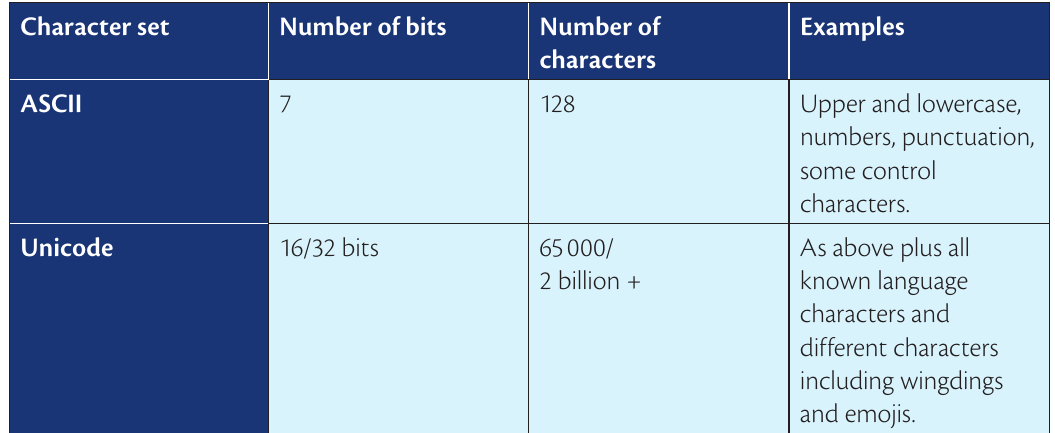
The key differences between ASCII and Unicode demonstrate the evolution of character encoding systems:
ASCII advantages:
- Simple and efficient for English text
- Uses less storage space (1 byte per character)
- Fast processing
- Universal support on all systems
Unicode advantages:
- Supports international languages
- Includes special symbols and emojis
- Future-proof as new characters are added
- Single standard for global communication
Storage consideration: Unicode characters require more storage space than ASCII. While ASCII needs just 1 byte per character, Unicode can need 2-4 bytes per character depending on the specific character being stored.
Summary
Key Points to Remember:
- Character encoding translates keyboard input into binary codes that computers can process and store
- ASCII uses 7 bits to represent 128 characters, mainly for English text and basic symbols
- Unicode uses 16 or 32 bits to represent thousands or billions of characters from all world languages
- Character sets define which characters a computer system can understand and display
- Unicode is backwards compatible with ASCII, meaning ASCII codes work within Unicode systems
- More bits per character = larger character set but increased storage requirements