Units of Information (AQA GCSE Computer Science): Revision Notes
📚Revision Notes
Units of information
What are bits and bytes?
Computers work by using tiny electronic switches called transistors that can be either turned on or off. These switches are incredibly small - millions of them can fit on a single computer chip! Because each switch has just two states (on or off), computers use the binary system which only uses the numbers 1 and 0.
Note
The binary system is fundamental to how computers work - it's based entirely on the two states of electronic switches: on (represented by 1) and off (represented by 0).
The bit - the smallest unit
A single binary digit is called a bit. This is the most basic unit of information in computing. The symbol for a bit is a lowercase b. Each bit represents one electronic switch being either on (1) or off (0).
Building up to bytes
When we group 8 bits together, we get what's called a byte. The symbol for a byte is a capital B. A byte is large enough to store one character (like a letter or number) and is the standard unit that computers use to measure data.
Note
There's also something called a nibble, which is 4 bits grouped together. A nibble is exactly half a byte, but it doesn't have its own symbol.
The storage unit hierarchy
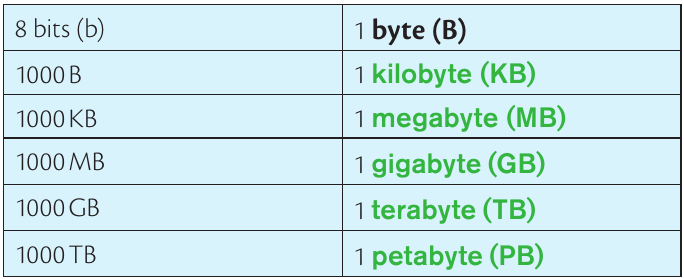
As files and data get larger, we need bigger units to measure them. Each unit is 1000 times larger than the previous one:
Important
Remember that each step up the hierarchy multiplies by 1000 - this is crucial for all conversions between units.
Here's how the units work:
- 8 bits (b) = 1 byte (B)
Think of it like a ladder - each step up multiplies by 1000. The prefix "kilo" means 1000 (just like 1 kilometre = 1000 metres), and this pattern continues through all the larger units.
Converting between units
Converting between these units is all about multiplying or dividing by 1000. Here's how it works:
Converting to larger units
When going up the hierarchy (e.g., bytes to kilobytes), you divide by 1000.
Converting to smaller units
When going down the hierarchy (e.g., megabytes to bytes), you multiply by 1000 for each step.
Example
Worked Example: Converting File Sizes
Let's say you have a file that's 2.5 MB. What is this in: a) Kilobytes? b) Bytes?
Solution:
(a) Converting MB to KB: Since we're going up one step in the hierarchy, we multiply by 1000:
(b) Converting MB to bytes: Since we're going down two steps (MB → KB → bytes), we multiply by 1000 twice:
Notice how we multiply by 1000 twice to go from MB to bytes, because we're going down two steps in the hierarchy.
Exam tips
Note
Essential Exam Strategies:
- Always show your working in calculations - the examiners want to see how you arrived at your answer
- Remember the factor of 1000 for each step (not 1024, which is sometimes used in different contexts)
- Check your answer makes sense - bigger units should give smaller numbers, smaller units should give bigger numbers
- Practice converting in both directions - up and down the hierarchy
Beyond the basics
Note
You might sometimes see references to 1 kilobyte being 1024 bytes instead of 1000. This comes from binary mathematics (since ), but for GCSE purposes, we use the standard decimal system with 1000 as the conversion factor.
Summary
Key Points to Remember:
- A bit is the smallest unit - it's just one binary digit (1 or 0)
- 8 bits make 1 byte - this is the basic building block for measuring data
- Each step up the hierarchy multiplies by 1000 - KB, MB, GB, TB, PB
- To convert up, divide by 1000 - to convert down, multiply by 1000
- Always show your working in exam questions to get full marks