Sound File Size and Playback Quality (AQA GCSE Computer Science): Revision Notes
📚Revision Notes
Sound file size and playback quality
What determines sound file size and quality?
When we record and store sound digitally, there are three main factors that affect both how good the sound quality is and how much storage space the file takes up. Understanding these factors helps us make smart decisions about recording settings and file management.
Note
Digital recording works by taking thousands of measurements of sound waves every second and converting them into numbers that computers can store and process.
Key factors affecting sound files
Sample rate
The sample rate is how many times per second we measure the sound wave. It's measured in Hertz (Hz), which means "samples per second". Think of it like taking snapshots of a sound wave - the more snapshots we take, the more accurate our digital copy will be.
A standard music CD uses a sample rate of 44.1 kHz, which means it takes 44,100 measurements every single second. This frequent sampling helps capture all the details of the original sound, including high-pitched notes and subtle variations.
Note
The 44.1 kHz standard was chosen because it can accurately capture all frequencies that humans can hear (up to about 20 kHz), according to the Nyquist theorem which states you need at least twice the frequency to accurately sample it.
Higher sample rates give us better sound quality because we're capturing more detail, but they also create larger files because we're storing more data points.
Sample resolution
Sample resolution (also called bit depth) is the number of bits used to store each individual sample. More bits mean we can represent the amplitude (loudness) of the sound wave more precisely.
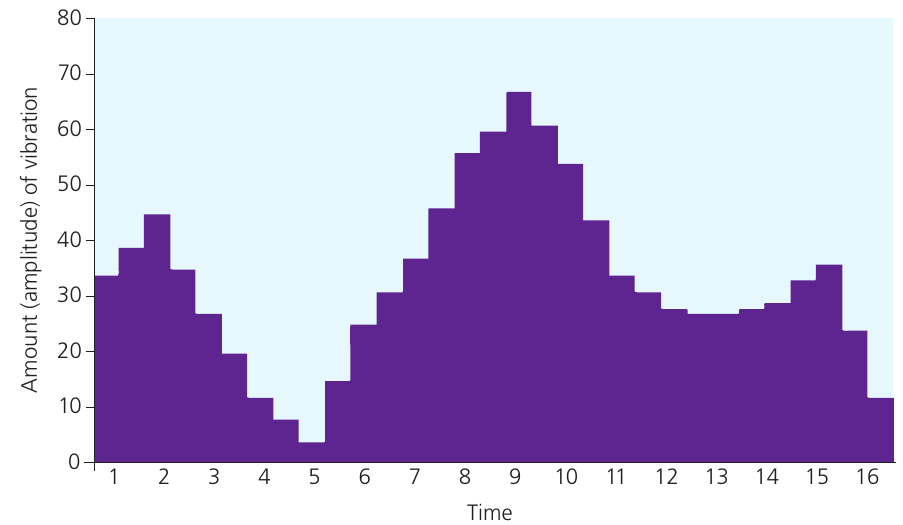
The chart above shows how digital sampling captures the shape of a sound wave. With higher resolution, we can measure the exact amplitude more accurately, giving us a more faithful reproduction of the original sound.
Important
Think of sample resolution like the precision of a ruler. A ruler with millimetre markings is more precise than one with only centimetre markings. Similarly, 24-bit resolution gives much more precise measurements than 16-bit resolution.
A typical CD uses 16-bit resolution, which means each sample can have one of 65,536 different digital values (that's possibilities). This range is enough to capture everything from the quietest whisper to the loudest crash.
More bits per sample means:
- More accurate representation of volume levels
- Better sound quality
- Larger file sizes
Duration
The duration is simply how long the recording lasts, measured in seconds. The longer the recording, the more samples we need to store, which directly increases the file size.
Note
Duration has a direct linear relationship with file size - double the length means double the file size, assuming all other settings remain the same.
A 3-minute song needs twice as much storage space as a 90-second song, assuming all other settings are the same.
Calculating sound file size
We can work out exactly how big a sound file will be using this formula:
This formula tells us the total number of bits needed. To convert to bytes, we divide by 8 (since there are 8 bits in a byte). To get megabytes, we divide bytes by 1,000,000.
Example
Worked Example: Calculating CD Quality File Size
Let's calculate the file size for a 1-minute recording at CD quality:
- Sample rate: 44.1 kHz (44,100 samples per second)
- Resolution: 16 bits per sample
- Duration: 60 seconds
Step 1: Calculate bits per second bits per second
Step 2: Calculate total bits
bits
Step 3: Convert to bytes bytes
Step 4: Convert to megabytes MB
So our 1-minute recording would be about 5.29 MB in size.
Stereo vs mono recordings
The calculations above assume mono recording (one channel). For stereo recordings, we need two channels - one for the left speaker and one for the right speaker. This doubles the amount of data we need to store.
Note
Stereo recordings create a sense of spatial audio by having slightly different sounds in each ear, just like how we naturally hear the world around us.
For stereo recordings, multiply your final answer by 2. So our example above would be 10.58 MB for stereo instead of 5.29 MB for mono.
The trade-off between quality and file size
There's always a balance to consider:
Higher quality settings:
- Better sound reproduction
- Larger file sizes
- More storage space needed
- Longer download/upload times
Lower quality settings:
- Some loss of sound detail
- Smaller file sizes
- Less storage space needed
- Faster file transfers
Important
This is why different situations call for different settings. Professional music production might use very high sample rates and resolutions, while phone calls use much lower quality settings to save bandwidth.
Summary
Key Points to Remember:
- Sample rate (Hz) = how many times per second we measure the sound
- Sample resolution (bits) = how precisely we measure each sample's amplitude
- Duration = how long the recording lasts
- File size formula:
- Higher quality always means larger file sizes - there's no way around this trade-off!