The need for secondary storage (Edexcel GCSE Computer Science): Revision Notes
📚Revision Notes
The need for secondary storage
What is secondary storage?
Secondary storage is like the long-term memory of a computer - it provides permanent storage for programmes and data that you want to keep, even when the computer is switched off. Think of it as the computer's filing cabinet where everything important gets stored safely.
Unlike the computer's main memory (RAM), secondary storage doesn't lose its contents when you turn off the power. This makes it essential for storing your files, photos, games, and applications permanently.
Note
The filing cabinet analogy is particularly helpful for understanding secondary storage - just like how you store important documents in a filing cabinet for long-term keeping, computers use secondary storage to keep programmes and data safe permanently.
Why do computers need secondary storage?
Computers need secondary storage because their main memory has some serious limitations that make it unsuitable for long-term storage.
The main memory (also called primary storage or RAM) is designed to be super fast so the CPU can access it quickly. However, this comes with a major drawback - it's volatile, which means it's completely dependent on power. When you switch off your computer, everything stored in main memory gets wiped clean, just like erasing a whiteboard.
Important
Without secondary storage, you would have to reload every programme and recreate every document from scratch each time you turned on your computer. Imagine having to reinstall your games, rewrite your homework, and reset all your preferences every single day!
Secondary storage solves this problem because it's non-volatile - it keeps all your data safe even when the power is off. It acts as a permanent home for your programmes and files.
How primary and secondary storage work together
These two types of storage work as a team to make your computer efficient and practical:
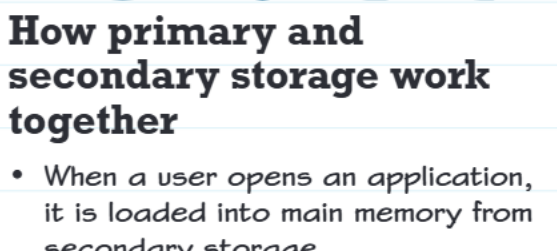
When you want to use an application like a game or word processor, here's what happens:
Example
Process Example: Opening and Using an Application
Step 1 - Loading: The programme gets copied from secondary storage (like your hard drive) into main memory so the CPU can access it quickly
Step 2 - Using: While you're using the application, any data files you open also get loaded into main memory
Step 3 - Saving: When you save your work, it gets transferred from main memory back to secondary storage for permanent keeping
Step 4 - Closing: When you close the application, it gets removed from main memory to free up space, but stays safely stored on secondary storage
This partnership means you get the best of both worlds - fast access when you need it, and permanent storage when you don't.
Key differences between primary and secondary storage
Understanding the differences between these storage types is crucial for GCSE exams:

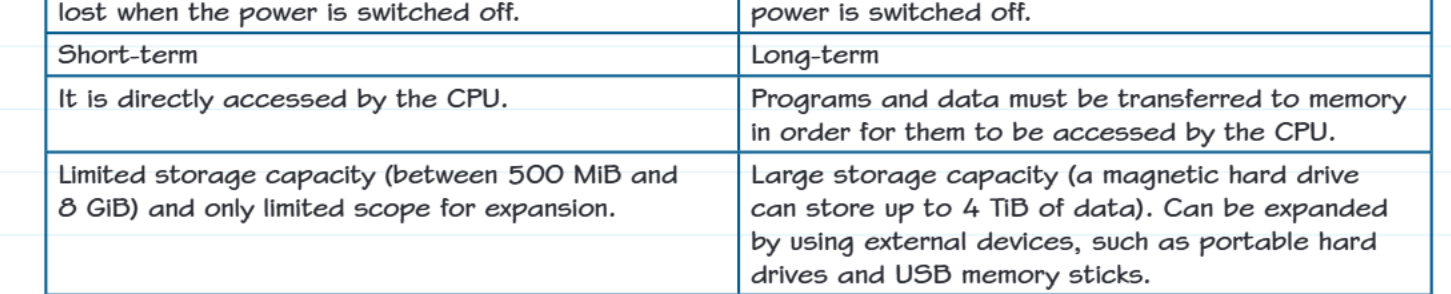
Here's what makes them different:
Primary storage (RAM):
- Volatile - loses data when power is switched off
- Short-term - only holds data temporarily while in use
- Direct CPU access - the processor can read from it immediately
- Limited capacity - typically between 500MB and 8GB
- Fast - data can be accessed in nanoseconds
Secondary storage (Hard drives, SSDs, etc.):
- Non-volatile - keeps data permanently, even without power
- Long-term - stores data for as long as you want
- Indirect CPU access - data must be transferred to memory first before CPU can use it
- Large capacity - can store up to 4TB or more
- Slower - takes longer to access than main memory
- Expandable - you can add more storage devices
Note
The capacity differences are particularly striking - while primary storage might hold 8GB, secondary storage can hold 4TB (4,000GB) or more. That's like the difference between a small notebook and an entire library!
Real-world example
Example
Worked Example: School Project Workflow
Think about when you're working on a school project:
- Your word processing software is stored on secondary storage (hard drive)
- When you open it, the programme loads into primary storage (RAM)
- As you type, your work is temporarily held in primary storage
- When you save your document, it gets permanently stored on secondary storage
- If there was a power cut before saving, you'd lose your work because primary storage is volatile!
Exam tips
Note
Common exam questions ask you to:
- Explain why both types of storage are needed
- Compare volatile and non-volatile storage
- Describe what happens when you open and save files
- Give examples of primary and secondary storage devices
Remember these key points:
- Primary = Fast but temporary
- Secondary = Slower but permanent
- Volatile = Vanishes without power
- Non-volatile = Keeps data without power
Remember!
Summary
Key Points to Remember:
- Secondary storage provides permanent, long-term storage for programmes and data, unlike main memory which is temporary
- Primary storage is volatile (loses data when power is off) while secondary storage is non-volatile (keeps data permanently)
- They work together: programmes load from secondary storage into primary storage for the CPU to use, then data can be saved back to secondary storage
- Primary storage offers fast, direct CPU access but has limited capacity, while secondary storage has huge capacity but requires data transfer to memory before CPU access
- Without secondary storage, computers would lose everythingwhen switched off, making them impractical for real-world use