Types of secondary storage (Edexcel GCSE Computer Science): Revision Notes
📚Revision Notes
Types of secondary storage
What is secondary storage?
Secondary storage refers to non-volatile storage devices that keep data permanently, even when the computer is switched off. Understanding the different types helps you choose the right storage solution for different situations.
There are three main types of secondary storage that you need to know about: magnetic storage, optical storage, and solid-state storage. Each type works in a completely different way and has its own advantages and disadvantages.
Note
Each storage type uses a fundamentally different physical principle to store data, which directly impacts their performance characteristics and ideal use cases.
Magnetic storage
Magnetic storage devices include hard disc drives (HDDs) and magnetic tape drives. These devices use magnetism to store your data by changing the magnetic properties of the storage medium.
How hard disc drives work
A hard disc drive contains a stack of circular metal plates called platters that spin at high speed. Both surfaces of each platter are coated with a special substance that can be magnetised. Each platter has its own read-write head that hovers just above the surface.
When writing data, an electromagnet in the read-write head magnetises tiny areas of the platter surface. The electromagnet can create two different magnetic orientations: north-south or south-north. These two different polarities represent the binary digits 1 and 0 respectively. The data gets stored along concentric tracks that are further divided into sectors.
Note
The read-write head never actually touches the platter surface - it floats on a cushion of air created by the spinning disc. This prevents wear but makes hard drives sensitive to physical shocks.
To read data back, the read-write head detects the magnetic state of each area on the platter as it spins underneath. This magnetic information is then converted back into the original 1s and 0s.
Optical storage
Optical storage devices such as CD drives, DVD drives, and Blu-ray drives use patterns of light to store data on removable discs. Instead of magnetism, these devices rely on laser technology.
How optical storage works
To write data onto an optical disc, a powerful laser burns the surface, changing its reflective properties. This creates a pattern of highly reflective areas called lands and less reflective areas called pits. In this system, a land represents 1 and a pit represents 0.
The data is organised along a single spiral track that winds outward from the centre of the disc to the edge, rather like a vinyl record but going the opposite direction.
Note
Unlike hard drives which use concentric circular tracks, optical discs use a continuous spiral track. This is why you can see the rainbow pattern on the surface of CDs and DVDs.
When reading data, a weaker laser beam shines onto the surface of the disc. The amount of light that reflects back depends on whether the laser hits a land or a pit. A light sensor detects these different reflexion levels and converts them back into 1s and 0s that the computer can understand.
Solid-state storage
Solid-state storage devices are found in portable computing devices like mobile phones, smart watches, USB sticks, and SSDs (solid-state drives). Unlike the other two types, solid-state storage has no moving parts whatsoever.
How solid-state storage works
Solid-state storage consists of a grid of tiny electronic components called transistors. Each transistor can trap electrons in small areas called electron pools.
To write data, an electrical current is applied to a transistor, which forces electrons through a barrier and traps them in pools. A full pool represents 1 and an empty pool represents 0.
Reading data involves applying a small voltage to each transistor. If the electron pool is empty, the transistor turns on and outputs a 1. If the pool is full, the transistor doesn't turn on and outputs a 0.
Important
The lack of moving parts in solid-state storage makes it much more durable and reliable than mechanical storage, but each memory cell can only be written to a limited number of times before it wears out.
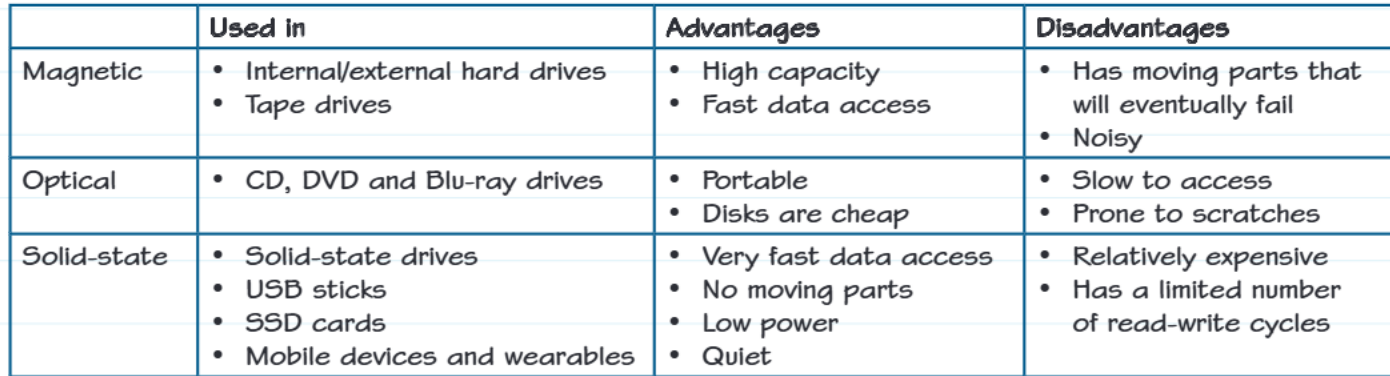
Comparing storage technologies
Each type of storage technology has different strengths and weaknesses that make them suitable for different purposes:
Magnetic storage offers high capacity and fast data access, making it ideal for desktop computers and servers. However, the moving parts eventually wear out and can be quite noisy during operation.
Optical storage provides excellent portability and the discs are very cheap to produce. This makes them perfect for distributing software or backing up data. The downside is that access speeds are slower and the discs can be easily damaged by scratches.
Solid-state storage delivers extremely fast data access with no moving parts, making it very reliable and quiet. It also consumes much less power than other types. The main drawbacks are the higher cost per gigabyte and the fact that each memory cell can only be written to a limited number of times.
Important
When choosing storage technology, always consider the specific requirements: capacity needs, speed requirements, durability demands, power consumption, and budget constraints. There's no single "best" storage type - it depends entirely on the application.
Real-world example
Example
Real-World Application: Why Mobile Phones Use Solid-State Storage
Let's examine why solid-state storage is ideal for mobile phones:
Physical Requirements:
- Mobile devices need storage that can handle being dropped, shaken, and carried around constantly
- Since solid-state storage has no moving parts, it won't be damaged by physical impacts that would destroy a traditional hard drive
Power Requirements:
- Phones run on battery power, so energy efficiency is crucial
- The low power consumption of solid-state storage helps extend battery life significantly
Performance Needs:
- Users expect instant app loading and quick file access
- Solid-state storage provides the fast access times needed for responsive mobile interfaces
This demonstrates how the physical properties of each storage type directly influence where they're most effectively used.
Exam tips
Important
Essential Exam Strategies for Storage Questions:
When answering questions about storage types, remember to:
- Always explain how each storage method works, not just what it does
- Use the correct technical terminology (platters, lands/pits, transistors)
- Consider the context when recommending storage types - think about portability, durability, speed, and cost requirements
- Practice identifying which storage type would be best for different scenarios
Common mistake to avoid: Don't just list features - explain the underlying technology and why it leads to specific advantages or disadvantages.
Remember!
Summary
Key Points to Remember:
Storage Methods:
- Magnetic storage uses electromagnets to create different magnetic polarities representing 1s and 0s
- Optical storage uses lasers to create reflective lands (1) and non-reflective pits (0)
- Solid-state storage uses transistors with full electron pools (1) or empty pools (0)
Key Advantages:
- Each storage type has specific advantages: magnetic for capacity, optical for portability, solid-state for speed and durability
- The choice of storage depends on factors like cost, speed, durability, and power consumption requirements
Decision Factors: Always consider the application requirements when selecting storage technology - no single type is best for all situations.