Connectivity on a LAN (Edexcel GCSE Computer Science): Revision Notes
📚Revision Notes
Connectivity on a LAN
What is LAN connectivity?
Local Area Networks (LANs) connect devices together so they can communicate and share resources. When setting up a LAN, you have choices about how devices connect to the network. Devices can connect using wired transmission media (like cables) or wireless transmission media (like Wi-Fi signals). Many modern networks actually use both methods together to get the best of both worlds.
Wired vs wireless networks
Understanding the differences between wired and wireless connections is crucial for choosing the right setup for different situations. Each method has its own strengths and weaknesses that make them suitable for different purposes.
Note
The choice between wired and wireless connectivity isn't just about convenience - it impacts performance, security, cost, and the overall network architecture. Understanding these trade-offs is essential for making informed networking decisions.
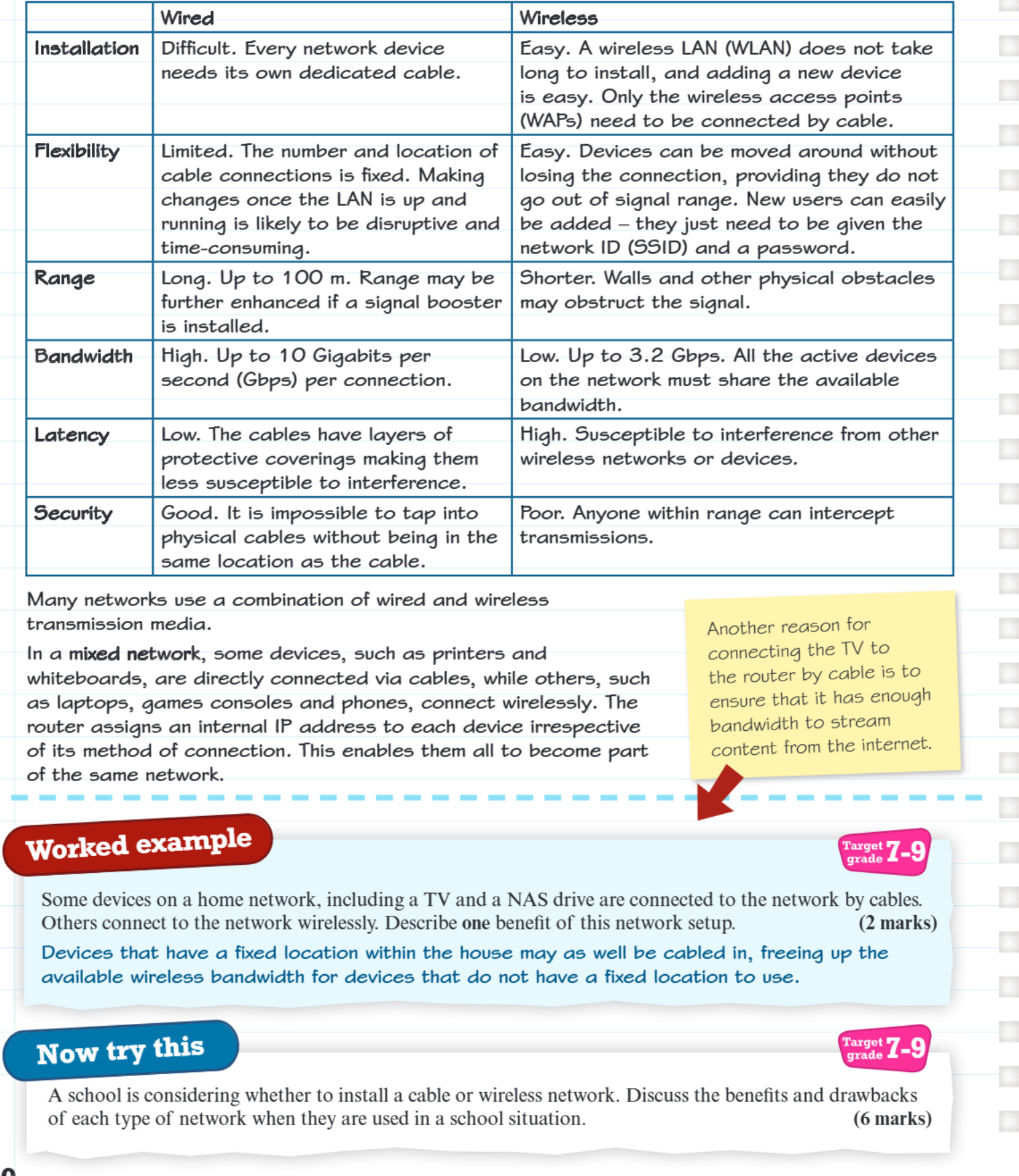
Installation complexity
Wired networks can be challenging to set up because every single device needs its own dedicated cable running to it. This means drilling holes, running cables through walls, and potentially disrupting the building during installation. It's like having to build individual roads to every house in a town.
Wireless networks are much simpler to install. You only need to connect the wireless access points (WAPs) with cables, and then all other devices can connect wirelessly. Adding new devices is as easy as giving them the network name (SSID) and password.
Flexibility and mobility
Wired connections create very rigid networks. Once a device is connected by cable, it's stuck in that location. If you want to move devices around or add new ones in different locations, you'll need to install new cables, which can be disruptive and time-consuming.
Wireless connections offer excellent flexibility. Devices can move freely around the coverage area without losing their connection. New users can join the network easily - they just need the network credentials. However, devices must stay within the signal range to maintain connectivity.
Range and coverage
Wired networks can cover impressive distances, typically up to 100 metres per cable segment. If you need to go further, you can install signal boosters to extend the range even more. The signal quality remains consistent along the entire cable length.
Wireless networks have more limited range, and the signal quality depends heavily on the environment. Walls, floors, and other physical obstacles can block or weaken the wireless signal, creating dead zones where devices can't connect properly.
Bandwidth and speed
Wired connections offer exceptional bandwidth, with modern cables supporting up to 10 Gigabits per second (Gbps) per connection. Each device gets its own dedicated pathway, so there's no sharing or competition for bandwidth.
Wireless networks have lower maximum speeds, typically up to 3.2 Gbps, and this bandwidth must be shared among all active devices on the network. As more devices connect and use the network simultaneously, each device gets a smaller slice of the available bandwidth.
Latency and interference
Latency refers to the delay between sending and receiving data. Wired connections have very low latency because the cables have protective coverings that shield them from interference. The signal travels directly through the cable without external disruption.
Important
Wireless Interference Sources
Wireless connections suffer from higher latency and are susceptible to interference from other wireless networks, microwave ovens, Bluetooth devices, and various electronic equipment. This can cause delays, dropped connections, or reduced performance - something that doesn't affect wired connections.
Security considerations
Wired networks offer superior security because it's physically impossible to intercept the data without actually accessing the cable. Someone would need to be in the same location as the cable and physically tap into it to steal information.
Important
Wireless Security Vulnerability
Wireless networks are more vulnerable because anyone within signal range could potentially intercept transmissions. While modern wireless security protocols provide strong protection, the radio signals can still be captured and potentially decoded by determined attackers.
Mixed networks - the best of both worlds
Most modern networks use a mixed network approach, combining both wired and wireless connections strategically. In this setup, devices that need maximum performance and security (like servers, desktop computers, or smart TVs) connect via cables. Meanwhile, mobile devices (laptops, phones, tablets) connect wirelessly for convenience.
The router manages all devices by assigning each one an internal IP address, regardless of how they're connected. This allows wired and wireless devices to communicate with each other seamlessly, forming one unified network.
Example
Mixed Network Example: Smart Home Setup
A smart TV might be connected by cable to ensure it has enough bandwidth to stream high-quality content from the internet, while family members use laptops and phones that connect wirelessly for everyday browsing and communication. This gives the best performance where it's needed most while maintaining convenience for mobile devices.
Real-world applications
Example
Home Network Implementation
Home networks often use mixed setups where entertainment devices (TVs, games consoles) and storage devices (NAS drives) are wired for reliability and speed, while personal devices like phones and tablets connect wirelessly.
Example
School Network Strategy
School networks need to carefully balance cost, security, and flexibility. Wired connections might be used for classroom computers and servers, while wireless access allows students to use tablets and laptops throughout the school grounds.
Exam tips
Note
Answering Network Connectivity Questions
When answering questions about network connectivity:
- Always consider both the advantages AND disadvantages of each approach
- Think about the specific situation described - is mobility important? Is security critical? Is cost a factor?
- Remember that mixed networks can offer solutions that pure wired or wireless networks cannot
- Use specific technical terms like bandwidth, latency, SSID, and WAP to demonstrate your understanding
Remember!
Summary
Key Points to Remember:
- Wired networks offer high speed, low latency, and excellent security, but lack flexibility and are expensive to install
- Wireless networks provide great flexibility and easy installation, but have limited bandwidth, higher latency, and security concerns
- Mixed networks combine both wired and wireless connections to maximise the benefits of each approach
- Installation difficulty is often the deciding factor - wireless networks are much easier and cheaper to set up initially
- Security requirements may dictate the choice - sensitive data often requires wired connections for maximum protection