Float Times and the Critical Path (HSC SSCE Mathematics Standard): Revision Notes
📚Revision Notes
Float Times and the Critical Path
Introduction to float time
When working with project networks, some activities must start immediately after their predecessor activities finish, while others have more flexibility. This flexibility is called float time or slack time.
Consider a simple example with three activities:
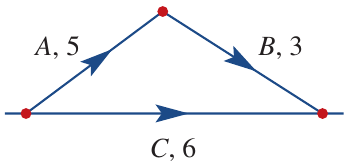
In this network:
- Activity takes hours
- Activity takes hours
- Activity takes hours
- Activity cannot begin until Activity is finished
- Both Activity and Activity must finish before the next activity can begin
Since Activities and together take hours, but Activity only requires hours, there are hours of spare time for Activity . This spare time is the float time for Activity .
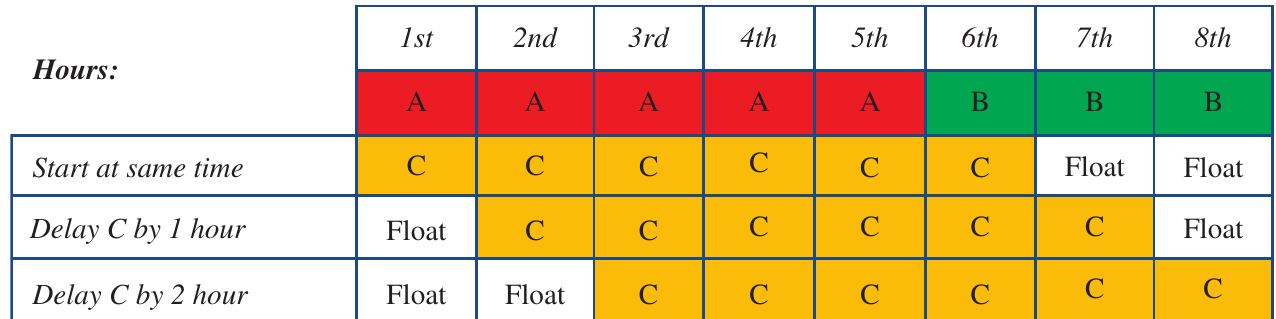
The following diagram shows how Activity can be scheduled flexibly:
Note
Notice that Activity can be delayed by up to hours without affecting the project timeline. However, delaying it by more than hours would cause delays to subsequent activities. This demonstrates the key principle of float time: it provides flexibility within limits.
Understanding float time calculations
What is float time?
Float time is the amount of time that a task in a project network can be delayed without causing a delay to subsequent tasks or the overall project completion time.
Calculating float time
Float time is calculated using the formula:
where:
- EST = Earliest Start Time (the earliest time an activity can begin)
- LST = Latest Start Time (the latest time an activity can start without delaying the project)
Important
Remember the formula: Float time equals Latest Start Time minus Earliest Start Time. This simple subtraction tells you exactly how much flexibility you have for scheduling each activity.
Finding EST and LST values
In network diagrams, vertices contain boxes showing EST and LST values for activities that begin at that vertex.
Looking at the examples shown:
- For Activity : EST and LST
- Float time hours
- Activity can be delayed by up to hours without affecting the project
- For Activity : EST and LST
- Float time hours
- Activity has no flexibility at all
Critical activities
An activity with zero float time is called a critical activity. Any delay to a critical activity will delay the entire project and extend the minimum completion time.
Important
Critical activities have zero float time. These activities must be completed on schedule because any delay directly impacts the project deadline. Think of them as the bottlenecks of your project.
In our example above, Activity is a critical activity because it has no float time. Starting this activity late would immediately impact the project deadline.
The critical path
The critical path is the sequence of critical activities through a network diagram. It represents the longest path from start to finish and determines the minimum project completion time.
To find the critical path:
- Identify all activities with zero float time
- Connect these activities from start to finish
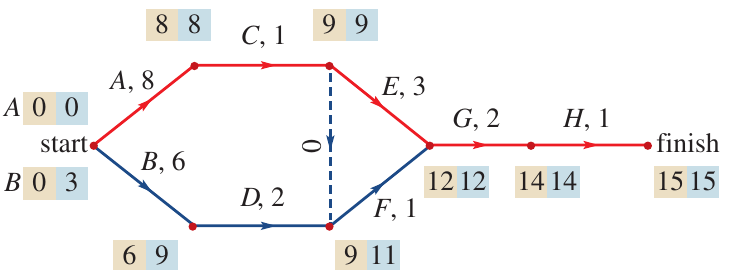
In this example, the critical path is highlighted in red and follows the route: . All activities on this path have zero float time.
Note
Key point: The minimum overall completion time of the project equals the EST value at the finish. In this case, the project takes a minimum of hours. This is why the critical path is so important—it determines how long your entire project will take.
Steps for critical path analysis
Follow these systematic steps to determine the critical path:
Step 1: Draw a box with two cells next to the start of each edge of the network diagram and at the finish.
Step 2: Calculate the EST for each activity by forward scanning:
Step 3: If an activity has more than one predecessor, the EST is the largest of the alternative values.
Step 4: The minimum overall completion time of the project is the EST value at the finish.
Step 5: The LST of the finish is the same as the EST of the finish. Calculate the LST for each activity by backward scanning:
Step 6: If an activity has more than one following activity, the LST is the smallest of all the alternative following activities.
Step 7: Calculate float time for each activity:
Step 8: If the float time equals zero, the activity is on the critical path.
Note
Exam tip: Always work methodically through forward scanning first, then backward scanning. Double-check your calculations, especially when activities have multiple predecessors or successors. A systematic approach prevents errors and ensures you don't miss any critical activities.
Worked example 1: Locating the critical path
Example
Worked Example: Locating the Critical Path
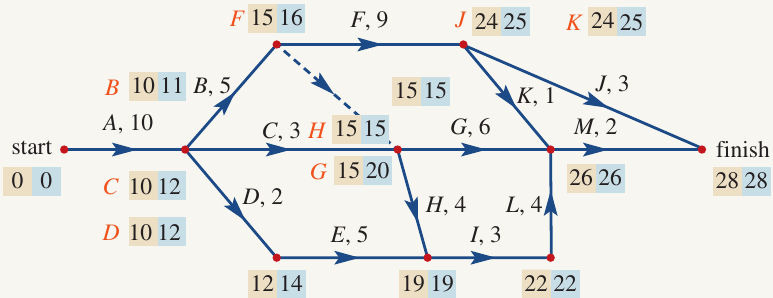
Question: What is the critical path in the network diagram shown below?
Solution:
The critical path consists of activities with zero float time. We need to look for vertices where:
Examining the diagram, the instances where EST equals LST are highlighted below:
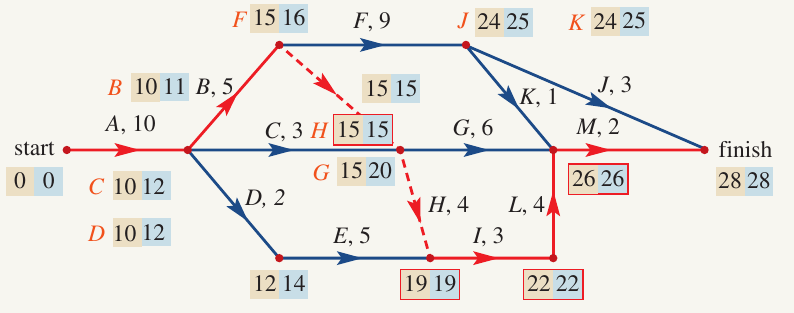
Following the red highlighted path, we can see the critical path is:
Note: The dummy activity (shown as a dashed line) is not included in the critical path description, even though it may lie on the path.
Worked example 2: Finding float time and critical path
Example
Worked Example: Finding Float Time and Critical Path
Question: A project has six activities as shown in the activity chart below:
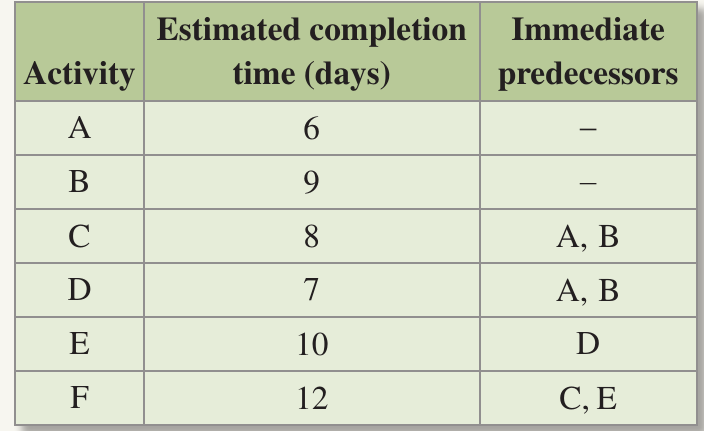
a) Draw a network diagram for this project.
b) Calculate the EST and LST for each activity.
c) What is the float time for each activity?
d) Write down the critical path of this project.
e) What is the minimum time required to complete the project?
Solution:
Part a) Drawing the network diagram
Activities and have no predecessors, so they can begin at the same time from the start.
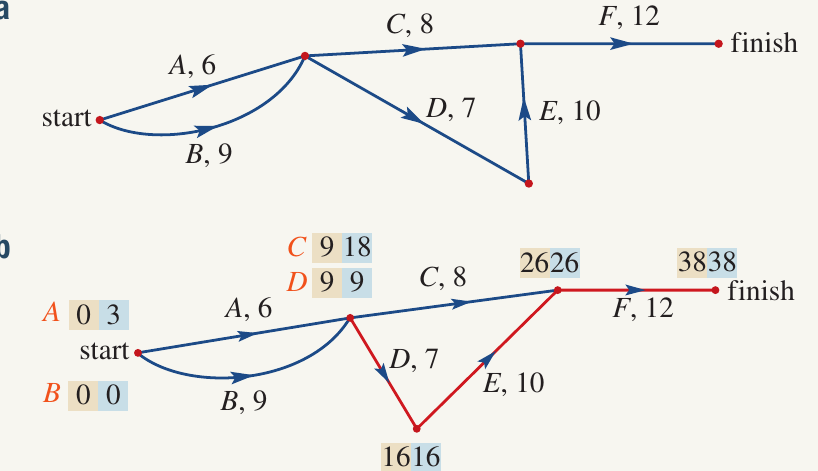
Part b) Calculating EST and LST
We use forward scanning to determine EST (shown in beige/yellow boxes) and backward scanning to determine LST (shown in blue boxes):
Forward scanning (EST):
- Start: EST
- After Activity : EST
- After Activity : EST
- Since and both require and to be complete, they use the larger EST value:
- After Activity : EST
- After Activity : EST
- After Activity : EST
- After Activity : EST
Backward scanning (LST):
- Finish: LST (same as EST)
- Before Activity : LST
- Before Activity : LST
- Before Activity : LST
- Before Activity : LST
- Activity LST
- Activity LST
Part c) Calculating float times
Using the formula :
- Activity : Float time days
- Activity : Float time
- Activity : Float time days
- Activity : Float time
- Activity : Float time
- Activity : Float time
Part d) Identifying the critical path
Activities with zero float time are on the critical path:
These are the critical activities that cannot be delayed without affecting the project completion time.
Part e) Minimum completion time
The minimum completion time is the EST value at the finish: 38 days
Important
Exam tip: When finding the critical path, always verify that the sequence of activities makes logical sense by checking predecessor relationships in the original activity table. This helps catch calculation errors early.
Remember!
Summary
Key Points to Remember:
-
Float time measures how much an activity can be delayed without affecting the project:
-
Activities with zero float time are critical activities that must be completed on schedule to avoid project delays.
-
The critical path is the sequence of critical activities from start to finish, representing the minimum project completion time.
-
Use forward scanning to calculate EST (starting from the beginning) and backward scanning to calculate LST (working from the end back to the start).
-
When an activity has multiple predecessors, use the largest EST. When it has multiple successors, use the smallest LST.
-
The minimum completion time equals the EST value at the finish vertex.