Decimal, Binary and Hexadecimal (AQA GCSE Computer Science): Revision Notes
📚Revision Notes
Number bases - Decimal, binary and hexadecimal
What are number bases?
A number base (also called a radix) tells us how many different symbols we use to write numbers. The number system we use every day is called the decimal system, but computers work differently and use other number systems too.
Note
Understanding different number bases is essential for computer science because computers process all information using binary (base 2), while programmers often work with hexadecimal (base 16) as a convenient shorthand.
Decimal system (base 10)
The decimal system is what we're most familiar with. It's called base 10 because it uses exactly 10 different symbols: 0, 1, 2, 3, 4, 5, 6, 7, 8, 9.
In decimal, each position in a number represents a power of 10. Let's look at how the number 527 works:

Example
Worked Example: Breaking down the decimal number 527
The number 527 breaks down as:
- 5 lots of 100 (5 × 10² = 500)
- 2 lots of 10 (2 × 10¹ = 20)
- 7 lots of 1 (7 × 10⁰ = 7)
- Total: 500 + 20 + 7 = 527
Each column is ten times bigger than the previous one as we move from right to left. This is why decimal is known as a "base 10" number system.
Binary system (base 2)
Binary is a number system that uses only two symbols: 0 and 1. This makes it perfect for computers, which work with electrical switches that are either ON (1) or OFF (0).
In binary, each position represents a power of 2, and each column heading is twice as big as the previous one as we move from right to left:

Example
Worked Example: Converting binary 10010101 to decimal
The binary number 10010101 converts to decimal like this:
Step 1: Identify the place values (powers of 2)
- Positions: 128, 64, 32, 16, 8, 4, 2, 1
Step 2: Multiply each binary digit by its place value
- 1×128 + 0×64 + 0×32 + 1×16 + 0×8 + 1×4 + 0×2 + 1×1
Step 3: Add the results
- = 128 + 0 + 0 + 16 + 0 + 4 + 0 + 1
- = 149 in decimal
Because binary uses only two symbols, it's known as a base 2 number system.
Hexadecimal system (base 16)
Hexadecimal (often shortened to "hex") uses 16 different symbols. For the first ten, it uses the familiar digits 0-9, but then it uses letters A-F to represent the decimal numbers 10-15:
Note
Hexadecimal symbol mapping:
- A = 10
- B = 11
- C = 12
- D = 13
- E = 14
- F = 15
This means hexadecimal is a base 16 system, where each position represents a power of 16.
Comparing the three number systems
Here's how the same numbers look in different bases:
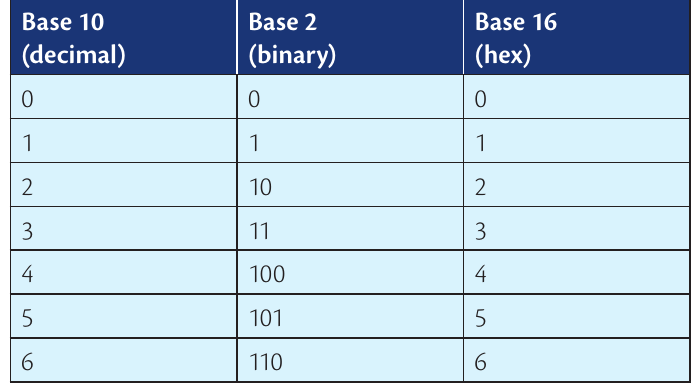
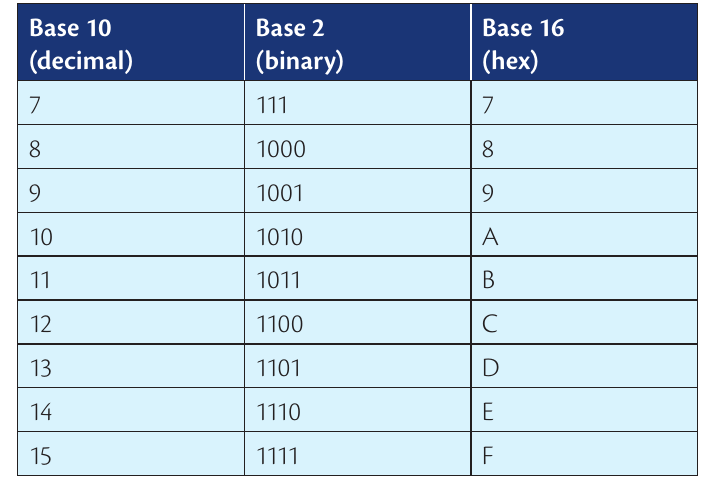
Note
Important patterns to notice:
- The number 10 in decimal becomes A in hexadecimal
- Each system counts up using its available symbols before moving to the next column
- Binary numbers get very long compared to decimal and hex
- Higher bases can represent larger numbers with fewer digits
Why computers use binary
Computers are made up of millions of tiny electrical switches. Each switch can only be in one of two states - either ON (represented by 1) or OFF (represented by 0). This perfectly matches the binary number system with its two symbols.
Important
Everything in a computer gets converted to binary:
- Numbers like 68
- Letters like 'D'
- Parts of images
- Segments of sound recordings
The computer needs to know what type of data each binary number represents to process it correctly.
This is why binary is the fundamental language of all digital computers and electronic devices.
Why programmers use hexadecimal
Working directly with long binary numbers like 11011100 and 11011000 is difficult for humans to read and remember. However, these same numbers can be written much more simply in hexadecimal as DC and D8.
Hexadecimal gives programmers several advantages:
- Much shorter than binary (easier to read and remember)
- Simple to convert to and from binary
- Reduces the chance of making errors when working with computer data
This is why hexadecimal is widely used by programmers as a convenient shorthand for binary numbers.
Summary
Key Points to Remember:
- Decimal (base 10): Uses symbols 0-9, each column is 10 times bigger than the previous
- Binary (base 2): Uses only 0 and 1, each column is 2 times bigger than the previous
- Hexadecimal (base 16): Uses 0-9 and A-F, perfect shorthand for binary numbers
- Computers use binary because they work with electrical switches (ON/OFF)
- Programmers use hexadecimal because it's much easier to work with than long binary numbers