Packet switching (Edexcel GCSE Computer Science): Revision Notes
📚Revision Notes
Packet switching
What is packet switching?
Packet switching is the method used to send data across the internet and computer networks. Instead of sending information as one large file, the data is broken down into smaller chunks called packets. Each packet can then travel independently across the network, potentially taking different routes to reach the same destination.
Note
Think of it like sending a long letter by tearing it into pieces, putting each piece in separate envelopes with the same address, and posting them all at once. Some envelopes might take different routes through the postal system, but they'll all arrive at the same destination where they can be put back together.
How packet switching works
The packet switching process follows four main steps:
Step 1: Breaking down the data When you want to send data (like an email or download a video), your computer breaks the large file into smaller, manageable packets. Each packet is numbered in sequence so they can be put back together correctly later.
Step 2: Routing through the network Routers examine each packet and decide the best path for it to take across the network. Different packets from the same original file might take completely different routes depending on network traffic and availability.
Step 3: Independent travel Packets travel through the network independently. Some might arrive at the destination before others, and they might arrive out of order. This is completely normal and expected.
Step 4: Reassembly at destination The receiving computer collects all the packets and uses the sequence numbers to put them back in the correct order, recreating the original data.
Understanding routers
Routers are special network devices that act like traffic directors for data packets. They create physical connections between different networks and decide where to send each packet next on its journey.
How routers make decisions
Important
When a router receives a packet, it follows a specific process:
- It reads the destination address from the packet header
- It consults its routing table (like a digital map of the network)
- It selects the most efficient route for the packet to take on the next part of its journey
- It forwards the packet to the next router or destination
Routers constantly communicate with each other about network conditions. If one route becomes congested or unavailable, routers can redirect packets through alternative paths, ensuring data still reaches its destination.
Data packet structure
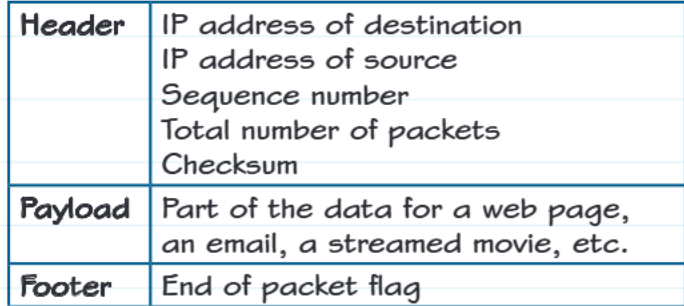
Every data packet has a standardised three-part structure that makes network communication possible:
Important
The Three-Part Packet Structure:
Header section contains all the essential addressing and control information:
- IP address of destination: Where the packet needs to go
- IP address of source: Where the packet came from
- Sequence number: The packet's position in the original data
- Total number of packets: How many packets make up the complete transmission
- Checksum: A mathematical value used to detect errors during transmission
Payload section is the actual data being transmitted. This could be part of a web page you're loading, a section of an email you're sending, or a chunk of a movie you're streaming online.
Footer section contains an "end of packet" flag that signals where the packet data finishes. This helps the receiving computer know it has received a complete packet.
Benefits of packet switching
Packet switching offers several important advantages over sending data as single large files:
Network efficiency: If one route becomes congested, packets can automatically take alternative paths. This prevents the entire network from slowing down due to a single bottleneck.
Reliability: If some packets are lost during transmission, only those specific packets need to be resent rather than the entire file.
Resource sharing: Multiple users can share the same network infrastructure simultaneously because their packets are interleaved rather than blocking each other.
Error detection: The checksum in each packet header allows the receiving computer to detect if any data has been corrupted during transmission.
What happens at the destination?
When packets arrive at their destination, the receiving computer performs several important checks:
Completeness verification: The computer checks that each packet has arrived intact and uncorrupted using the checksum values.
Inventory check: It verifies that all packets from the transmission have been received by comparing against the total number indicated in the headers.
Note
Error handling: If any packets are missing or corrupted, the receiving computer requests that the source computer resend those specific packets.
Reassembly: Finally, the computer uses the sequence numbers to arrange all packets in the correct order and rebuilds the original data.
This process ensures that the data you receive is exactly the same as what was originally sent, despite having travelled through the network in separate pieces via potentially different routes.
Summary
Key Points to Remember:
- Packet switching breaks large data into smaller packets that travel independently across networks
- Routers act as traffic directors, using routing tables to find the best path for each packet
- Every packet has three parts: header (addressing info), payload (actual data), and footer (end marker)
- Different packets can take different routes to the same destination, making the network more efficient
- The receiving computer reassembles packets using sequence numbers and checks for errors using checksums