The internet (Edexcel GCSE Computer Science): Revision Notes
📚Revision Notes
The internet
What is the internet?
The internet is a massive global system that connects billions of digital devices all around the world. Think of it as the world's largest public network - a Wide Area Network (WAN) that spans across countries and continents. Unlike a local network in your school or home, the internet connects devices everywhere, from your smartphone to servers in different countries.
Note
The internet differs from local networks (like your home Wi-Fi) because it connects devices globally rather than just within a single location. This global reach is what makes services like email, social media, and online shopping possible across continents.
A network of networks
Here's something important to understand: no single company or organisation owns the entire internet. Instead, it works as a network of networks. This means:
- Some networks are privately owned by companies
- Others are public networks
- They all connect together using super-fast fiber-optic cables and satellites
- This creates what we call the backbone of the internet - the main infrastructure that carries internet traffic
Important
Key Concept: The decentralised nature of the internet is what makes it so resilient. If one part goes down, data can still flow through alternative routes, ensuring global connectivity remains intact.
IP addressing
Every device connected to the internet needs a unique identifier so it can send and receive data properly. This identifier is called an IP address, where IP stands for Internet Protocol.
How IP addresses work
Think of an IP address like a postal address for your device on the internet. Just as your home needs a unique address for mail delivery, your device needs a unique IP address for internet communication.
There are two main versions of IP addresses:
Example
Comparison: IPv4 vs IPv6
IPv4 (Internet Protocol version 4):
- Been around since the 1970s
- Uses 32-bit addresses
- Can create about 4 billion unique addresses
- This isn't enough anymore because we have so many internet-connected devices
IPv6 (Internet Protocol version 6):
- The newer version designed to solve the address shortage
- Uses 128-bit addresses
- Can generate 340 trillion trillion unique addresses
- Provides enough addresses for all current and future devices
Dynamic vs static IP addresses
Most devices use a dynamic IP address. This means:
- Your device gets assigned an IP address from a shared pool when you connect to the internet
- When you disconnect, the address goes back to the pool
- Next time you connect, you'll probably get a different IP address
However, some devices like routers and web servers use static IP addresses:
- These addresses never change
- They stay permanently connected to the internet
- This allows other devices to always find them at the same address
Domain names
IP addresses are hard for humans to remember (imagine typing 192.168.1.1 every time!). That's why we use domain names instead. Domain names like www.pearson.com are much easier to remember and use than their equivalent IP addresses.
URL (Uniform Resource Locator)
A URL is the complete web address of any resource on the internet - whether that's a web page, image, video, or document. It tells your browser exactly where to find what you're looking for on the internet.
Note
URLs are like detailed directions that include not just the "address" (domain name) but also the specific "room" (file path) where the information you want is stored on that server.
What happens when you request a web page
When you type a URL into your browser's address bar, here's what happens behind the scenes:
Step 1: DNS lookup
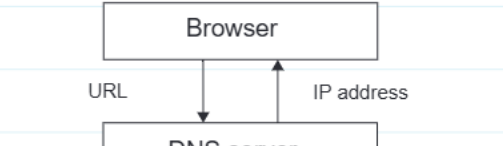
First, your browser needs to convert the human-friendly domain name into an IP address that computers can understand. Your browser sends the URL to a DNS server (Domain Name System server). The DNS works like a phone book for the internet - its job is to match domain names to their corresponding IP addresses.
Step 2: Contacting the web server
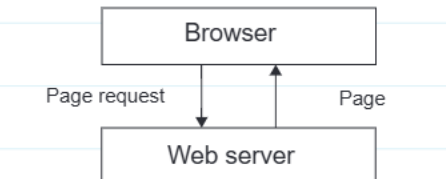
Once your browser gets the IP address back from the DNS server, it can now contact the correct web server. The browser sends an HTTP page request to the web server that hosts the website.
Step 3: Receiving and displaying the page
The web server finds the correct files for the requested page and sends them back to your browser. Your browser then renders (processes and displays) the page content on your screen.
Real-world example
Example
Worked Example: Booking a Holiday Online
Think about booking a holiday online with Smarts Leisure Group:
- You type their website URL into your browser
- Your browser asks a DNS server for the IP address of their web server
- The DNS server responds with the IP address
- Your browser contacts their web server using this IP address
- The web server sends back the holiday booking page
- Your browser displays the page so you can browse and book holidays
The web server needs a static IP address so that the DNS system can always direct customers to the right place. If the IP address kept changing, people wouldn't be able to find their website reliably.
Exam tips
Summary
Key Points for Exams:
- Remember that the internet is a "network of networks" - not owned by any single organisation
- Know the difference between IPv4 and IPv6 - IPv6 was created because IPv4 ran out of addresses
- Understand that DNS converts domain names to IP addresses - like a phone book for the internet
- Static IP addresses don't change and are used by servers, while dynamic addresses are temporary and used by most personal devices
Remember!
Summary
Essential Takeaways:
- The internet is the world's largest public WAN, connecting billions of devices globally
- Every internet-connected device needs a unique IP address to communicate
- IPv6 was created to solve the IPv4 address shortage problem
- DNS servers convert human-friendly domain names into machine-readable IP addresses
- Web servers use static IP addresses so they can always be found by browsers and DNS systems