The TCP/IP model (Edexcel GCSE Computer Science): Revision Notes
📚Revision Notes
The TCP/IP model
What is the TCP/IP model?
The TCP/IP model is a hierarchical network protocol stack that allows different devices to communicate with each other over the internet. Think of it like a postal system - there are different stages that your letter goes through before reaching its destination, and each stage has a specific job to do.
This model consists of four distinct layers, where each layer handles a different aspect of network communication. The beauty of this system is that each layer only needs to know how to communicate with the layers directly above and below it - they don't need to understand how all the other layers work.
Note
The key principle here is layer independence - each layer operates as a separate module, making the system more manageable and allowing different technologies to work together seamlessly.
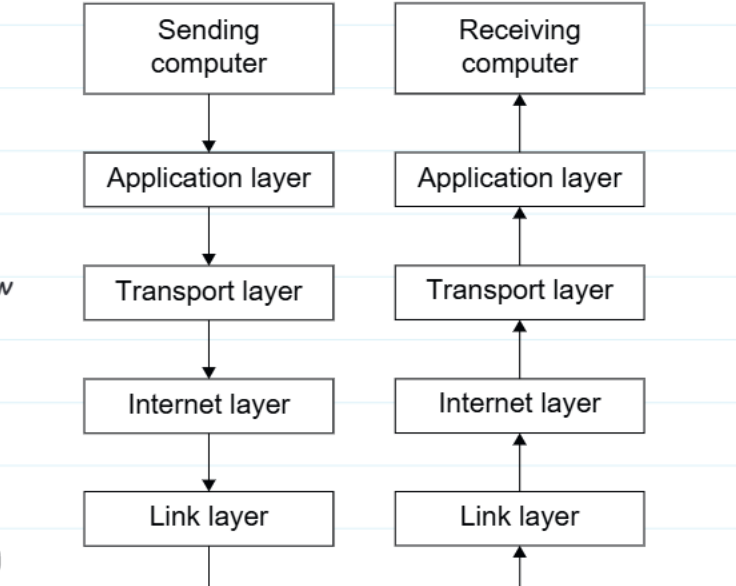
How data flows through the TCP/IP stack
When you send data (like opening a webpage or sending an email), the information travels down through the stack on your computer, gets transmitted across the internet, then travels up through the stack on the receiving computer.
Here's the key process:
- Sending side: Data moves down from Application → Transport → Internet → Link layer
- Receiving side: Data moves up from Link → Internet → Transport → Application layer
Each layer adds its own information (called headers) to help the data reach its destination correctly. This process is like putting your letter in multiple envelopes, where each envelope has different addressing information.
Note
The Envelope Analogy
Imagine mailing a letter where you need multiple levels of addressing:
- Inner envelope: Your message (Application layer)
- Next envelope: Delivery instructions (Transport layer)
- Outer envelope: Street address (Internet layer)
- Postal service handling: Physical transportation (Link layer)
The four layers explained
Application layer
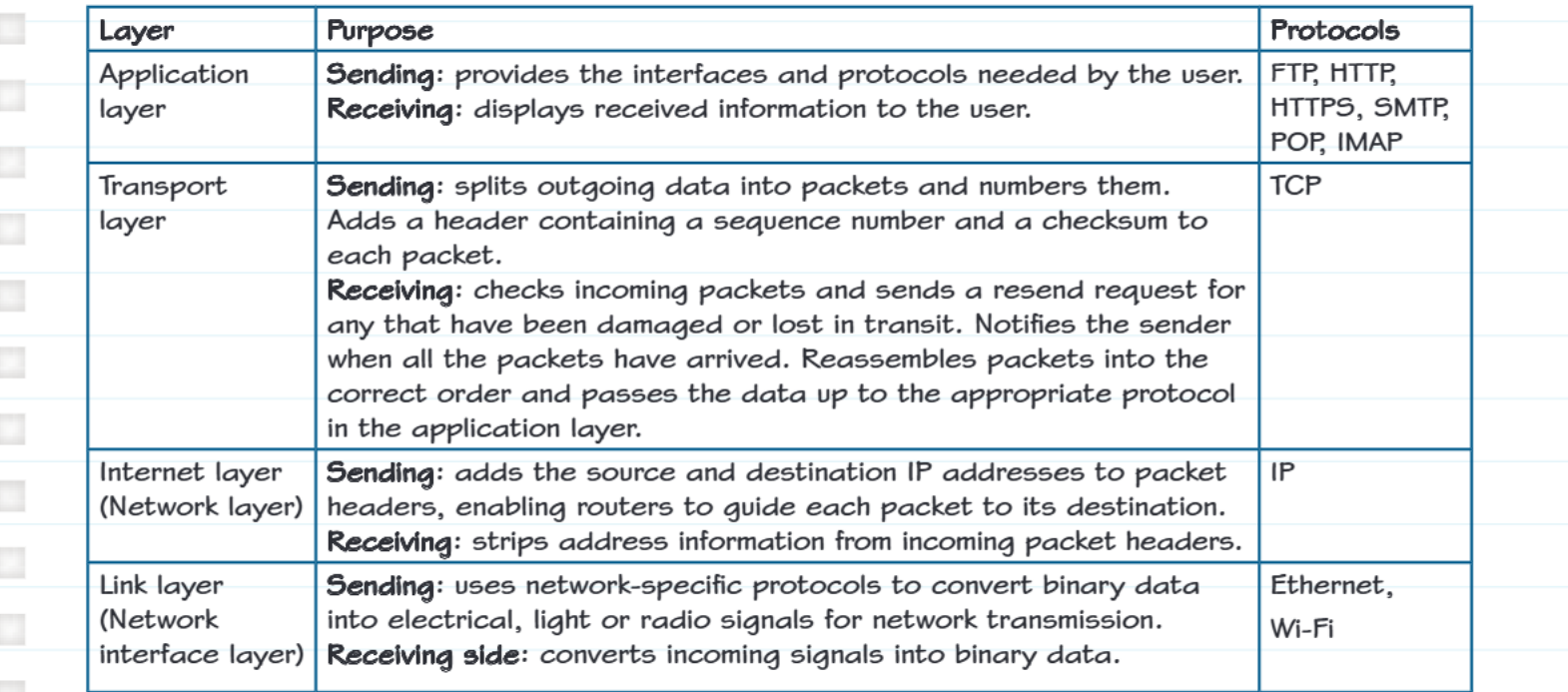
This is the layer closest to you as the user. It provides the interfaces and services that applications need to communicate over the network.
When sending: The application layer provides the protocols and interfaces needed by the user When receiving: It displays the received information to the user in a format they can understand
Key protocols: FTP (file transfer), HTTP/HTTPS (web browsing), SMTP (sending emails), POP/IMAP (receiving emails)
Transport layer
This layer is responsible for reliable data delivery. It makes sure your data gets to its destination complete and in the right order.
When sending:
- Splits large amounts of data into smaller packets
- Numbers each packet with a sequence number
- Adds a checksum to detect errors
When receiving:
- Checks incoming packets for errors
- Sends requests for any missing or damaged packets to be resent
- Puts packets back in the correct order
- Passes complete data up to the application layer
Key protocol: TCP (Transmission Control Protocol)
Example
Worked Example: TCP in Action
When you download a 10MB file:
- TCP splits the file into thousands of small packets (typically 1500 bytes each)
- Each packet gets a sequence number: Packet 1, Packet 2, Packet 3, etc.
- If Packet 47 gets lost in transmission, TCP detects this and requests only Packet 47 to be resent
- Once all packets arrive, TCP reassembles them in the correct order before passing the complete file to the application
Internet layer (Network layer)
This layer handles the routing of data across the internet. It's like the addressing system that ensures your data packet knows where to go.
When sending: Adds source and destination IP addresses to packet headers so routers know where to send each packet
When receiving: Removes address information from incoming packet headers
Key protocol: IP (Internet Protocol)
Link layer (Network interface layer)
This is the physical layer that handles the actual transmission of data over network hardware.
When sending: Converts binary data into electrical, light, or radio signals appropriate for the network medium (cables, fibre optics, wireless)
When receiving: Converts incoming physical signals back into binary data
Key protocols: Ethernet (wired networks), Wi-Fi (wireless networks)
Key exam points
Important
Understanding TCP's role: TCP is particularly important because it ensures reliable delivery. It identifies and requests retransmission of lost or corrupted packets, reassembles packets in the correct order, and passes complete data to the application layer.
Important
Link layer function: The link layer uses network-specific protocols to convert binary data into the appropriate physical signals for transmission, whether that's electrical signals for Ethernet cables or radio waves for Wi-Fi.
Note
Layer independence: Remember that each layer operates independently - they don't need to know how other layers work, only how to pass data to adjacent layers.
Remember!
Summary
Key Points to Remember:
- The TCP/IP model has four layers: Application, Transport, Internet, and Link
- Data flows down the stack when sending and up when receiving
- Each layer adds its own headers with specific information needed for that layer's function
- TCP ensures reliable delivery by checking for errors and requesting retransmission of lost packets
- IP handles routing by adding source and destination addresses
- The link layer converts data into physical signals for actual network transmission