Comparing the Distribution of a Numerical Variable Across Groups (VCE SSCE General Mathematics): Revision Notes
📚Revision Notes
Comparing the Distribution of a Numerical Variable Across Groups
Understanding the comparison
When we compare data distributions, we're looking at how the same measurement varies across different groups. This is meaningful when we measure the same numerical variable for different categories of people or things.
For example, we might want to compare:
- Maximum daily temperatures in Melbourne during March with those in Sydney during March
- Test scores of students who attended a revision class with those who did not
In each case, we're working with two types of variables:
- A numerical variable (the measurement being taken, such as temperature or test score)
- A categorical variable (the grouping, such as city or attendance at revision class)
Note
When we compare distributions across groups, we're actually investigating the relationship between a numerical variable and a categorical variable. This is a fundamental concept in statistics that helps us understand how measurements differ between groups.
Methods for comparing distributions
There are two main graphical methods for comparing distributions:
- Back-to-back stem plots: Best for comparing two small data sets
- Parallel boxplots: Can be used for two or more groups, and works well with larger data sets
Both methods help us compare distributions by examining their centre, spread, and any outliers.
Comparing distributions using back-to-back stem plots
What is a back-to-back stem plot?
A back-to-back stem plot is different from a regular stem plot because it has:
- One central stem (the tens digits)
- Two sets of leaves (the units digits), one on each side
- Each set of leaves represents data from one of the two groups being compared
Reading a back-to-back stem plot
In a back-to-back stem plot:
- The stem sits in the middle
- One group's data appears on the left side
- The other group's data appears on the right side
- Each leaf represents one data value
Example
Worked Example: Comparing Male Life Expectancy
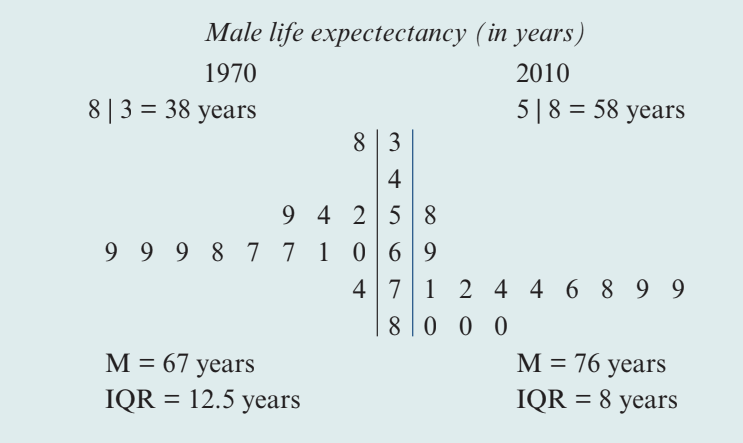
Consider male life expectancy data from several countries in 1970 and 2010:
Male life expectancy (in years)
Solution:
Step 1 - Compare centre:
The median life expectancy of males in 2010 ( years) was higher than in 1970 ( years).
Step 2 - Compare spread:
The spread of life expectancies of males in 2010 ( years) was lower than the spread in 1970 ( years).
Step 3 - Write a conclusion:
In conclusion, the median life expectancy for men in these countries has increased over the last 40 years, and the variability in male life expectancy has decreased over this time interval.
Writing a comparison
When comparing distributions using back-to-back stem plots, follow these three key steps:
- Compare centre: Write a sentence using the medians
- Compare spread: Write a sentence using the IQRs
- Write a conclusion: Use your observations to add a general conclusion in context
Important
Exam Tip
Always use comparative language such as "higher than," "lower than," "greater than," or "less than" when comparing statistics. Don't just state the values without comparison.
Comparing distributions using parallel boxplots
What are parallel boxplots?
Parallel boxplots are multiple boxplots drawn on the same axis, allowing easy visual comparison of:
- Centre (median)
- Spread (IQR)
- Outliers
Advantages of parallel boxplots
Unlike back-to-back stem plots, parallel boxplots:
- Can compare more than two groups
- Work well with larger data sets
- Provide immediate visual comparison of key features
Key features to compare
When using parallel boxplots to compare distributions, your report should address three essential features:
- Centre: Compare the medians (the vertical lines inside the boxes)
- Spread: Compare the IQRs (the widths of the boxes)
- Outliers: Identify any outliers (shown as individual points beyond the whiskers)
Example
Worked Example: Comparing Pulse Rates
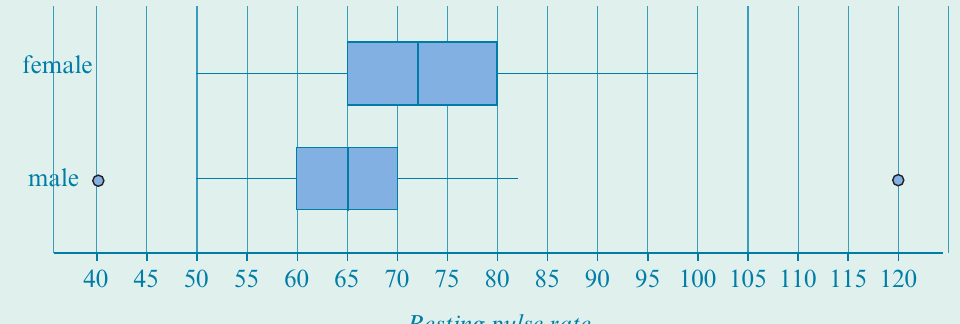
The following parallel boxplots show the distribution of resting pulse rates (in beats per minute) for female and male students:
Solution:
Step 1 - Compare centre:
The median pulse rate for females ( beats/minute) is higher than that for males ( beats/minute).
Step 2 - Compare spread:
The spread of pulse rates for females () is higher than for males ().
Step 3 - Identify outliers:
There are no female pulse rate outliers. The males with pulse rates of 40 and 120 were outliers.
Step 4 - Write a conclusion:
In conclusion, the median pulse rate for females was higher than for males, and female pulse rates were generally more variable than male pulse rates.
Practice example: Exam time
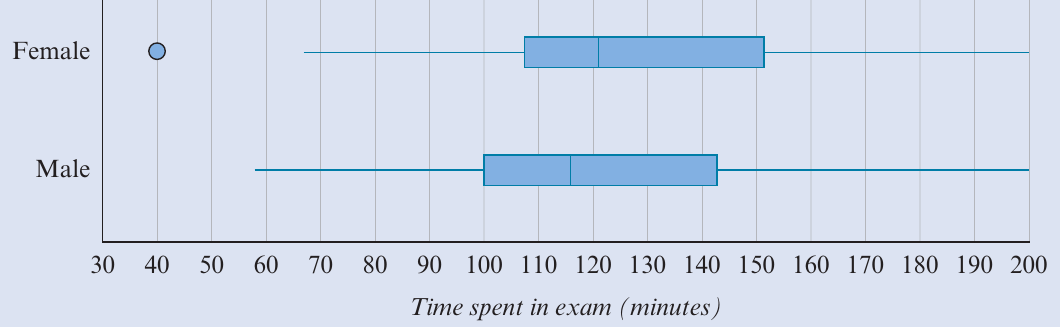
The following parallel boxplots display the time (in minutes) spent in an exam by female and male students:
Note
When comparing these distributions, remember to:
- Compare the medians to discuss centre
- Compare the IQRs to discuss spread
- Identify any outliers
- Write a clear, informative conclusion in context
Summary
Summary
Key Points to Remember:
-
Comparing numerical distributions across groups investigates the relationship between a numerical variable and a categorical variable
-
Back-to-back stem plots are suitable when:
- There are only two groups
- The data sets are small
-
Parallel boxplots are suitable when:
- There are two or more groups
- The data sets are larger
-
Data distributions should always be compared in terms of:
- Centre: Quote the median for each group
- Spread: Quote the IQR for each group
- Outliers: Mention the values of any outliers
-
Your comparison should include clear comparative statements and a conclusion written in the context of the data
Remember!
Important
Essential Guidelines for Comparing Distributions:
- When comparing distributions, you're investigating the relationship between a numerical variable and a categorical variable
- Use back-to-back stem plots for two small data sets
- Use parallel boxplots for larger data sets or when comparing more than two groups
- Always address three features: centre (median), spread (IQR), and outliers
- Use comparative language ("higher than," "lower than") rather than just stating values
- End with a clear conclusion that relates to the context of the data