The Five-Number Summary and the Boxplot (VCE SSCE General Mathematics): Revision Notes
📚Revision Notes
The Five-Number Summary and the Boxplot
Introduction to the five-number summary
When analyzing data, knowing just the median and quartiles tells us about the centre and spread of a distribution. However, to get a complete picture of the distribution, we also need information about the extreme values (the tails). This is where the five-number summary becomes useful.
The five-number summary combines information about the centre, spread, and extremes of a data set into one concise summary. It consists of five key values arranged in order:
Note
The five-number summary provides a complete snapshot of your data's distribution in just five values. This concise format makes it perfect for quick comparisons between different data sets and forms the foundation for boxplot construction.
where:
- Minimum is the smallest data value
- is the first quartile (lower quartile)
- is the median (the middle value)
- is the third quartile (upper quartile)
- Maximum is the largest data value
This summary provides the foundation for creating one of the most powerful tools in data analysis: the boxplot.
Understanding the boxplot
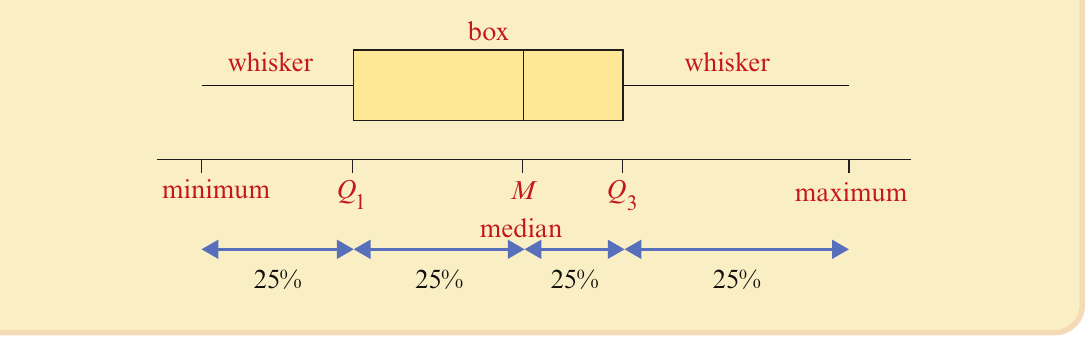
A boxplot (also called a box-and-whisker plot) is a graphical way to display the five-number summary. It provides a visual representation that makes it easy to see the distribution's shape, centre, spread, and any unusual values.
Components of a boxplot
A boxplot consists of several key features:
- The box: A rectangle that extends from to , containing the middle 50% of all data values
- The median line: A vertical line inside the box marking the median position
- The whiskers: Horizontal lines extending from each end of the box to the minimum and maximum values
- Four equal sections: Each representing 25% of the data
Understanding what each part represents helps you interpret the distribution:
- 25% of values lie between the minimum and
- 25% of values lie between and the median
- 25% of values lie between the median and
- 25% of values lie between and the maximum
Note
Each quarter of a boxplot contains exactly the same number of data points, even though the physical lengths of the sections may differ. This is a key insight for understanding how data is distributed across the range.
Constructing a boxplot from a five-number summary
Let's work through an example to understand how to create a boxplot from a five-number summary.
Worked example: Life expectancy data
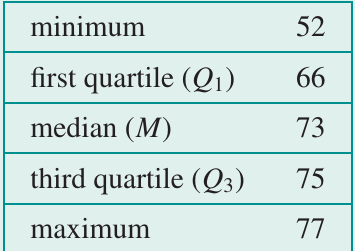
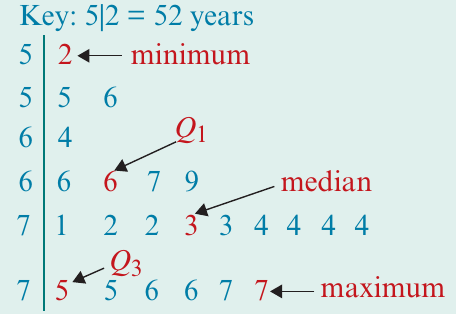
Consider the following five-number summary for life expectancies (in years) across 23 countries:
Example
Worked Example: Constructing a Boxplot
Step 1: Draw a horizontal number line that covers the full range of values (from 50 to 80 years in this case). Make sure to label it clearly.
Step 2: Draw a rectangular box starting at and ending at .
Step 3: Mark the median value with a vertical line inside the box at .
Step 4: Draw the whiskers by extending lines from the centre of each end of the box to the minimum value (52) and maximum value (77).
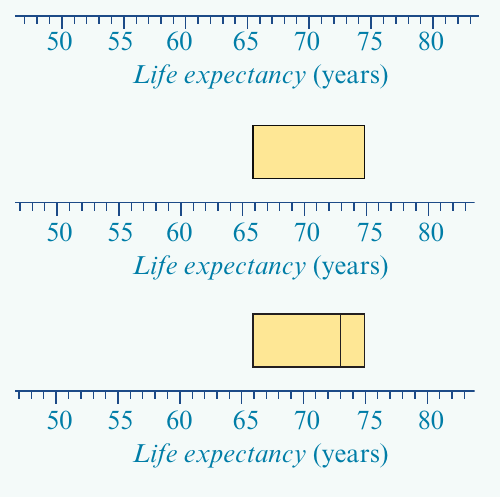
The completed boxplot gives you an immediate visual sense of how the life expectancies are distributed across these countries.
Boxplots with outliers
Sometimes a data set contains outliers – values that are unusually far from the rest of the data. A long whisker on a boxplot might indicate either extreme skewness or the presence of outliers. To distinguish between these situations, we need a precise definition of what counts as an outlier.
Defining outliers mathematically
Important
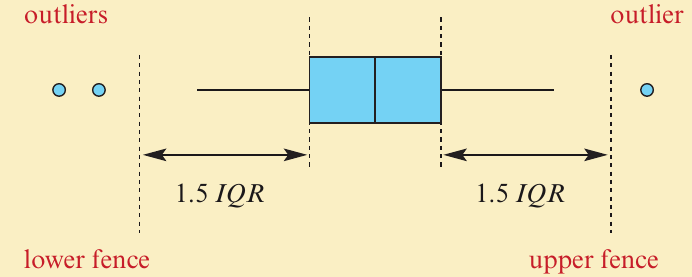
An outlier is any data value that lies more than 1.5 interquartile ranges beyond the quartiles. Specifically, a value is considered an outlier if it is:
- Greater than (upper outlier)
- Less than (lower outlier)
where (the interquartile range).

Upper and lower fences
To identify outliers systematically, we use imaginary boundaries called fences:
Upper fence:
Lower fence:
Any data value beyond these fences is classified as a potential outlier.
Note
The choice of 1.5 as the multiplier for the IQR is not arbitrary – it's a statistical convention that provides a good balance between identifying truly unusual values and avoiding false positives. This standard is widely accepted in data analysis.
Drawing boxplots with outliers
When creating a boxplot that includes outliers:
- Calculate the upper and lower fences
- Identify which data values fall beyond these fences
- Plot each outlier as an individual dot or circle
- Draw the whiskers only to the smallest and largest values that are not outliers
This modified approach helps you see both the main body of the data and any unusual extreme values separately.
Using a CAS calculator to create boxplots
While you can construct boxplots by hand, using a CAS calculator makes the process much faster and ensures accuracy, especially when dealing with large data sets.
Example: Student marks data
Display the following set of 19 marks as a boxplot with outliers:
28, 21, 21, 3, 22, 31, 35, 26, 27, 33, 43, 31, 30, 34, 48, 36, 35, 23, 24
Example
Worked Example: Using a TI-Nspire CAS
- Start a new document and add a Lists & Spreadsheet page
- Enter the data into a list called "marks"
- Add a Data & Statistics page
- Select "marks" as the variable for the x-axis
- Change the plot type from dot plot to boxplot
- Use the trace function to read key values
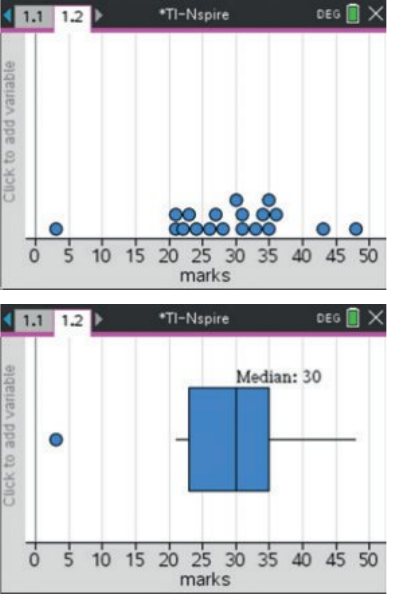
The calculator will automatically identify outliers and display them as separate dots. For this data set:
- Minimum value: 3 (an outlier)
- First quartile:
- Median:
- Third quartile:
- Maximum value: 48
Note
Modern CAS calculators automatically apply the 1.5 IQR rule when identifying outliers, making the process faster and reducing calculation errors. However, you should still understand how to calculate fences manually for exam situations.
Reading and interpreting boxplots
Being able to extract information from a boxplot is just as important as creating one. Let's practice reading values and calculating statistics from boxplots.
Worked example: Reading values from a boxplot
Example
Worked Example: Extracting Information from a Boxplot
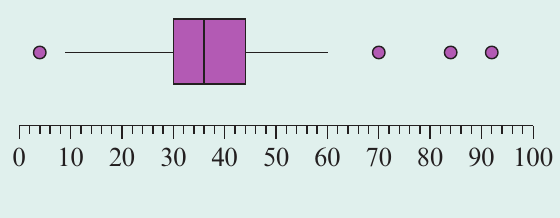
For the boxplot shown, we can identify:
a) The median: (the vertical line inside the box)
b) The quartiles: and (the ends of the box)
c) The interquartile range:
d) Minimum and maximum values: Minimum , Maximum
e) Possible outliers: The dots show outliers at 4, 70, 84, and 92
f) Upper fence calculation:
Any value above 65 is classified as an outlier.
g) Lower fence calculation:
Any value below 9 is classified as an outlier.
Estimating percentages from boxplots
One of the powerful features of boxplots is that they allow you to estimate what percentage of data falls within certain ranges. This is because each section of the boxplot represents a specific percentage of the data.
Key percentage facts
- 25% of values are less than
- 50% of values are less than the median
- 75% of values are less than
- 25% of values are greater than
Example
Worked Example: Percentage Calculations
For a boxplot with , Median , , and Maximum :
a) Percentage less than 54: Since 54 is , 25% of values are less than 54.
b) Percentage less than 55: Since 55 is the median, 50% of values are less than 55.
c) Percentage less than 59: Since 59 is , 75% of values are less than 59.
d) Percentage greater than 59: If 75% are less than 59, then 25% are greater than 59.
e) Percentage between 54 and 59:
f) Percentage between 54 and 86:
Relating boxplots to distribution shape
The shape of a boxplot reveals important information about how the data is distributed. By examining the position of the median within the box and the relative lengths of the whiskers, you can identify whether a distribution is symmetric or skewed.
Symmetric distributions
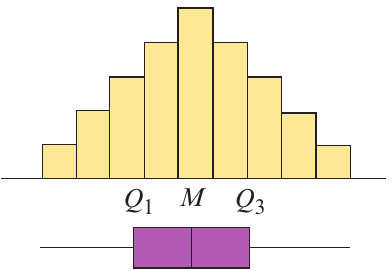
A symmetric distribution has data values evenly spread around the median. Its boxplot characteristics include:
- The median line is approximately in the centre of the box
- The whiskers are roughly equal in length
- The box appears balanced on either side of the median
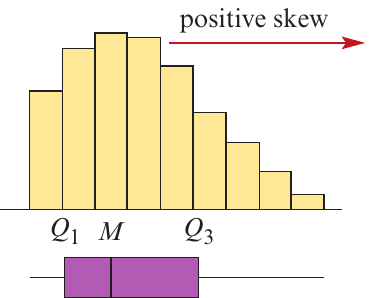
Positively skewed distributions
A positively skewed (or right-skewed) distribution has most data clustered toward the lower values, with a tail extending toward higher values. Its boxplot shows:
- The median is positioned toward the left side of the box (closer to )
- The left whisker is short
- The right whisker is long, reflecting the tail of higher values
Negatively skewed distributions
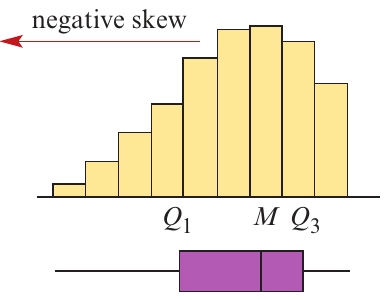
A negatively skewed (or left-skewed) distribution has most data clustered toward the higher values, with a tail extending toward lower values. Its boxplot displays:
- The median is positioned toward the right side of the box (closer to )
- The right whisker is short
- The left whisker is long, reflecting the tail of lower values
Important
A common mistake is to confuse the terms "positively skewed" and "negatively skewed" with the direction of the longer whisker. Remember: positively skewed means the tail extends toward the positive (right) direction, and negatively skewed means the tail extends toward the negative (left) direction.
Distributions with outliers
When a distribution contains outliers, the boxplot shows large gaps between the main body of data and extreme values. The box and whiskers represent the main data, while dots separated from them indicate outliers.
Using boxplots to describe distributions
Boxplots are extremely effective tools for describing the key features of a distribution. When analyzing a boxplot, you should comment on four main aspects: shape, centre, spread, and outliers.
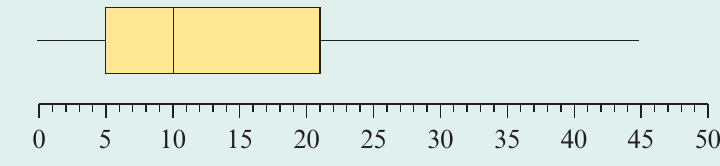
Worked example: Positively skewed distribution
Example
Worked Example: Describing a Positively Skewed Distribution
Description: The distribution is positively skewed with no outliers. The distribution is centred at 10 (the median value). The spread of the distribution, as measured by the IQR, is 16, and as measured by the range, is 45.
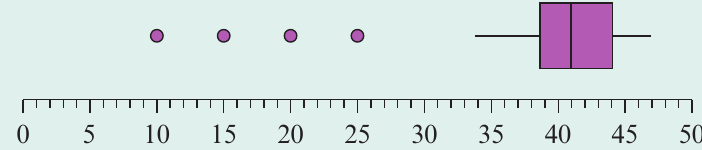
Worked example: Symmetric distribution with outliers
Example
Worked Example: Describing a Symmetric Distribution with Outliers
Description: The distribution is symmetric but with outliers. The distribution is centred at 41 (the median value). The spread of the distribution, as measured by the IQR, is 5.5, and as measured by the range, is 37. There are four outliers: 10, 15, 20, and 25.
Worked example: Real-world application
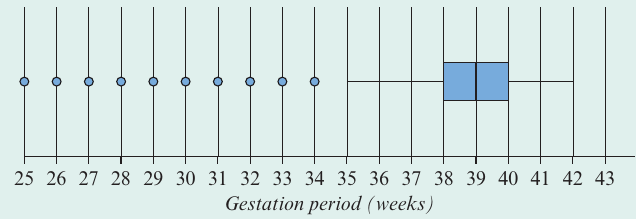
The boxplot shows the gestation period (completed weeks) for a sample of 1000 babies born in Australia.
Example
Worked Example: Describing Real-World Data
Description: The distribution of gestational period is negatively skewed with several outliers. The distribution is centred at 39 weeks (the median value). The range of the distribution is 17 weeks, but the interquartile range is only 2 weeks. Any gestational period of 35 weeks or less is considered unusual, with outliers at 25, 26, 27, 28, 29, 30, 31, 32, 33, and 34 weeks.
Note
This example demonstrates why boxplots are so valuable in practical applications – they make it easy to identify both typical values and unusual cases that might need special attention. In medical contexts like this, outliers may represent cases requiring additional care or monitoring.
Exam tips
Important
Critical Exam Tips
- Always label your axes clearly when drawing boxplots, including units of measurement
- Show your working when calculating fences for outliers: write out the formulas with substituted values
- Check your quartile positions carefully – a common error is mixing up and
- Use the correct terminology in descriptions: use "positively skewed" not "skewed to the right"
- Remember the 1.5 IQR rule for identifying outliers – this is the standard definition
- When describing distributions, always address all four features: shape, centre, spread, and outliers
Remember!
Summary
Key Points to Remember:
- The five-number summary consists of: minimum, , median, , and maximum
- A boxplot visually displays the five-number summary, with the box representing the middle 50% of data
- Outliers are values more than beyond the quartiles
- Upper fence = and Lower fence =
- Each quarter of a boxplot contains 25% of the data values
- The shape of a distribution can be determined from boxplot features: symmetric distributions have centered medians and equal whiskers, while skewed distributions show off-center medians and unequal whiskers