Threats to digital systems (Edexcel GCSE Computer Science): Revision Notes
📚Revision Notes
Social engineering threats
What is social engineering?
Social engineering is a type of cyber attack that exploits human psychology rather than technical weaknesses. Hackers use these techniques to trick people into sharing confidential information like passwords, bank details, or personal data. They might also convince victims to install harmful software (malware) on their computers.
The key thing to remember is that social engineering attacks target human nature - things like trust, helpfulness, curiosity, and fear of getting in trouble. This makes them particularly dangerous because they don't rely on complex technical knowledge.
Note
Unlike traditional hacking methods that target software vulnerabilities, social engineering attacks are successful because they exploit the most unpredictable element in any security system: human behaviour.
Types of social engineering attacks
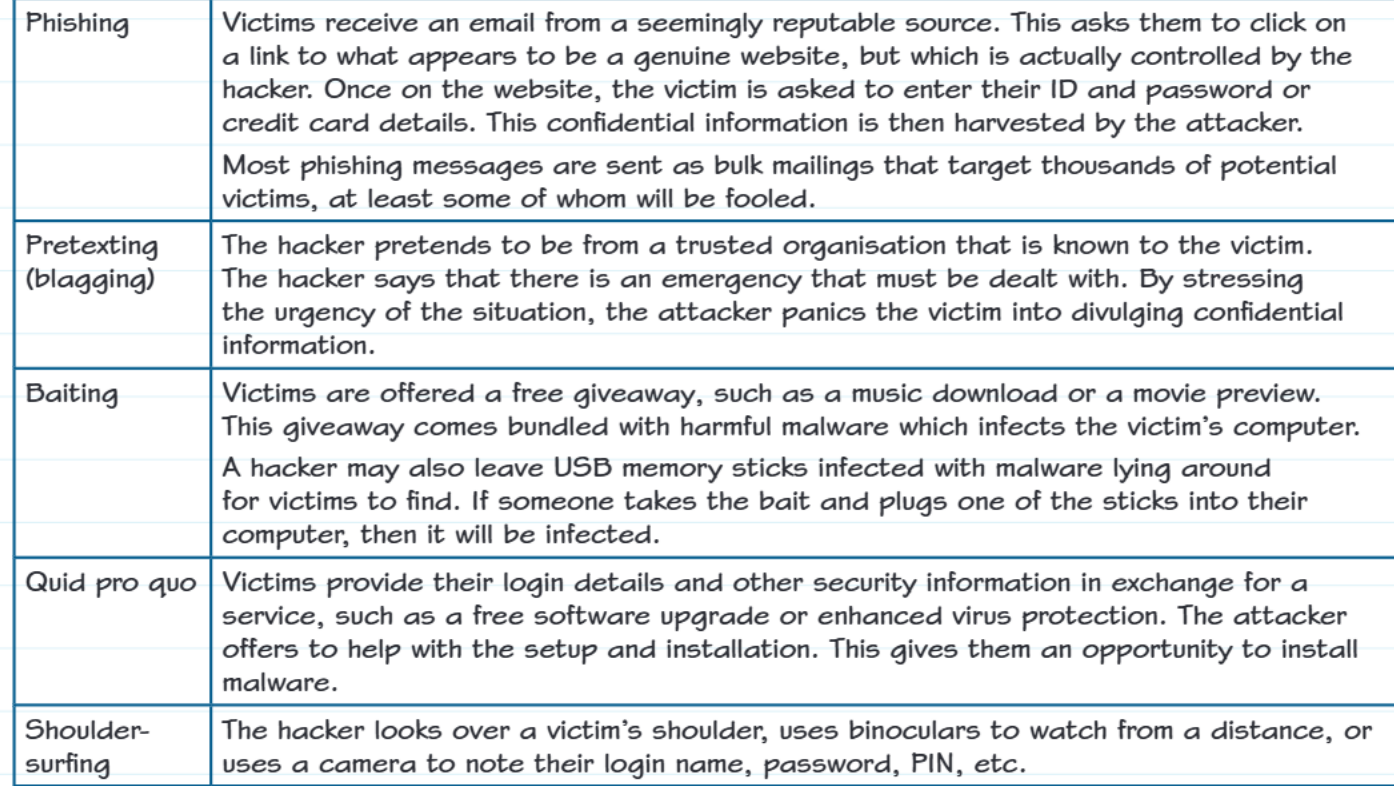
There are five main types of social engineering attacks you need to know about:
Phishing
Phishing is one of the most common social engineering attacks. Here's how it works:
- People receive emails that appear to come from trustworthy sources like banks, online shops, or social media sites
- The email asks them to click on a link that seems to lead to a genuine website
- However, the website is actually fake and controlled by hackers
- When victims enter their username, password, or credit card details, the hackers steal this information
- Many phishing attacks use mass emails sent to thousands of people at once, hoping that at least some will fall for the trick
Important
Warning signs of phishing emails:
- Poor spelling and grammar mistakes
- Generic greetings like "Dear Customer" instead of your actual name
- Urgent language claiming immediate action is needed
- Suspicious email addresses that don't match the supposed sender
Pretexting (also called blagging)
Pretexting involves hackers pretending to be someone they're not to gain trust. The process typically works like this:
- The hacker claims to work for a trusted organisation that the victim knows
- They create a fake emergency situation that needs urgent attention
- By making the victim feel stressed and panicked about the "emergency," they pressure them into sharing private information
- The victim believes they're helping solve a legitimate problem, but they're actually giving away sensitive data
For example, someone might call pretending to be from your school's IT department, claiming there's a security breach and they need your login details to "protect your account."
Baiting
Baiting attacks use the promise of something attractive to lure victims into a trap:
- Hackers offer free items like music downloads, movie previews, or software
- These "gifts" contain hidden malware that infects the victim's computer once downloaded
- Physical baiting can involve leaving USB memory sticks in public places (like school corridors or car parks)
- Curious people who find these USB sticks often plug them into their computers to see what's on them
- This automatically installs malware on their system
The bait exploits people's natural curiosity and desire for free things.
Quid pro quo
Quid pro quo means "something for something" - it's essentially a trade, but a dishonest one:
- Hackers offer victims a helpful service, such as free software upgrades or better antivirus protection
- In exchange, they ask for login details or other security information
- The hacker offers to help set up the new "service," which gives them the perfect opportunity to install malware
- The victim thinks they're getting something valuable, but they're actually being scammed
Shoulder-surfing
Shoulder-surfing is a more direct, physical form of social engineering:
- Hackers watch victims enter passwords, PINs, or other sensitive information
- This can be done by literally looking over someone's shoulder in public places
- They might use binoculars to watch from a distance
- Some attackers use hidden cameras to record people typing
- The information gathered can then be used to access the victim's accounts
Important
This technique is particularly common in crowded places like coffee shops, libraries, or transport hubs.
Worked example analysis
Example
Worked Example: Identifying Social Engineering
Scenario: Sienna receives a security notification claiming to be from her bank, asking her to click a link to change her password because it might be a phishing attempt.
Three reasons why this might be suspicious:
- The notification contains spelling mistakes and poor grammar
- She's being asked to click on a link (legitimate banks usually ask you to log in through their official website instead)
- The message creates urgency by saying immediate action is required
Additional warning signs that suggest the email isn't genuine:
- There might be a suspicious attachment included
- The sender's email address probably doesn't look official
- It uses a generic greeting like "Dear Customer" rather than Sienna's actual name
How attackers use stolen information
When social engineering attacks succeed, hackers can use the stolen information for financial gain in several ways:
- Identity theft: Using personal details to open bank accounts or apply for loans in the victim's name
- Direct theft: Accessing bank accounts or credit cards to steal money
- Selling information: Trading stolen data on illegal online marketplaces
- Ransomware: Using access to lock people out of their own computers and demanding payment
- Further attacks: Using one person's information to target their friends, family, or colleagues
Note
The impact of social engineering attacks extends beyond immediate financial loss - victims often face long-term consequences including damaged credit scores, ongoing identity monitoring needs, and emotional distress.
Remember!
Summary
Key Points to Remember:
- Social engineering exploits human psychology rather than technical weaknesses - hackers rely on emotions like trust, fear, and curiosity
- The five main types are: phishing (fake emails), pretexting (impersonation), baiting (attractive offers with malware), quid pro quo (fake helpful services), and shoulder-surfing (physical observation)
- Always be suspicious of urgent requests for personal information, especially if they come via email or unexpected phone calls
- Verify independently - if someone claims to be from your bank or school, hang up and call the official number to check
- Physical security matters too - be aware of who might be watching when you enter passwords or PINs in public places