Enlargements (AQA GCSE Maths): Revision Notes
📚Revision Notes
Enlargements
What is an enlargement?
An enlargement is a transformation that changes the size of a shape but keeps its angles the same. To fully describe an enlargement, you need two pieces of information: the scale factor and the centre of enlargement.
The scale factor tells you how much each length in the original shape is multiplied by to create the enlarged shape.
Centre of enlargement
The centre of enlargement is a fixed point from which the enlargement takes place. When you draw lines from the centre through corresponding points on the original shape (object) and the enlarged shape (image), these lines will always meet at the centre of enlargement.
Note
The centre of enlargement can be located anywhere - inside the shape, outside the shape, or even on one of its vertices. The key is that all lines connecting corresponding points will pass through this single point.
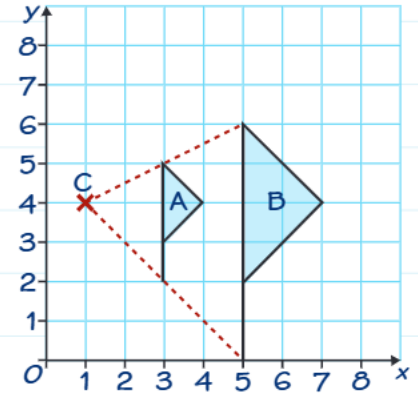
Key properties of enlargements
Understanding these fundamental properties will help you work with enlargements effectively:
- Angles remain unchanged - all angles in the enlarged shape are identical to those in the original shape
- Lengths change - all lengths are multiplied by the scale factor
- Shape remains similar - the enlarged shape is mathematically similar to the original
Note
Mathematical similarity means the shapes have the same angles and their corresponding sides are in the same ratio (the scale factor). This is why enlargements preserve the shape's appearance while changing its size.
Understanding scale factors
When the scale factor is greater than 1, the image becomes larger than the original object.
When the scale factor is between 0 and 1 (a fraction), the image becomes smaller than the original object. This is sometimes called a reduction, but it's still technically an enlargement.
Important
Common Misconception Alert: Many students think that if the scale factor is less than 1, it's not an enlargement. Remember that in mathematics, an "enlargement" with a fractional scale factor still follows the same rules - it just produces a smaller image!
Step-by-step method for enlargements
Follow these steps to perform an enlargement accurately:
-
Draw lines from the centre - Draw straight lines from the centre of enlargement through each vertex of the original shape
-
Calculate new distances - For each vertex, multiply both the horizontal and vertical distances from the centre of enlargement by the scale factor
-
Plot new vertices - Mark the new positions for each vertex at the calculated distances from the centre
-
Join the vertices - Connect your new vertices with straight lines to complete the enlarged shape
-
Check your work - Verify that each length in the enlarged shape is the scale factor times the corresponding length in the original shape
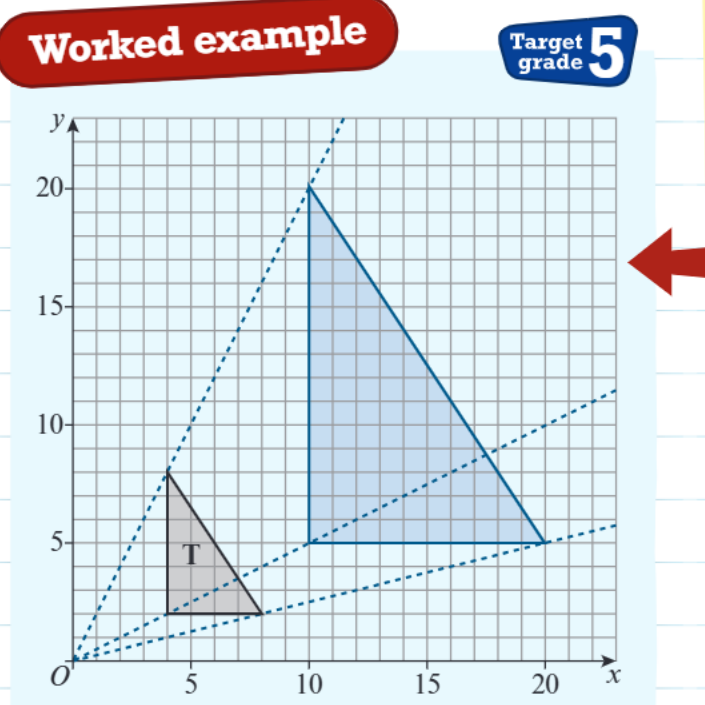
Worked example breakdown
Example
Worked Example: Enlarging Triangle T
Given: Triangle T with scale factor of and centre
Step 1: Draw lines from the centre through each vertex of triangle T
Step 2: Multiply each distance by
Step 3: Calculate new positions
- For the top vertex: horizontal distance =
- For the top vertex: vertical distance =
Step 4: Plot the new vertices and join them with straight lines
Final check: Each length in the enlarged triangle is times the corresponding length in the original triangle ✓
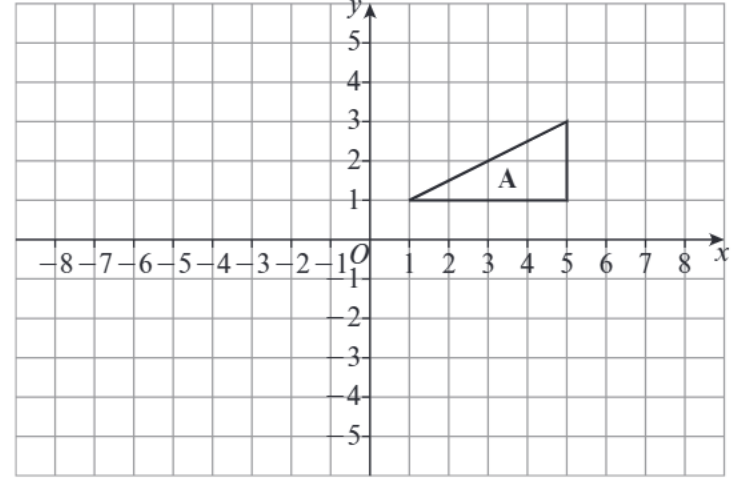
Fractional scale factors
When working with fractional scale factors (like or ), remember that the image will be smaller than the original object. The same method applies - you still multiply distances from the centre by the scale factor, but the result will be a smaller shape.
Important
Key Point: Whether the scale factor makes the shape larger or smaller, the mathematical process remains exactly the same. Always multiply distances from the centre of enlargement by the scale factor, regardless of whether it's greater than or less than 1.
Remember!
Summary
Key Points to Remember:
- An enlargement needs both a scale factor and a centre of enlargement to be fully described
- Angles stay the same, but lengths change by the scale factor
- Lines from corresponding points always meet at the centre of enlargement
- Scale factors between 0 and 1 create smaller images
- Always check your work by comparing lengths in the final shape to the original