Society (AQA GCSE Design and Technology): Revision Notes
📚Revision Notes
Society and new and emerging technologies
New and emerging technologies have a significant impact on society, particularly through inclusive design principles. Inclusive design focuses on creating products and services that can be used by as many people as possible, regardless of their abilities, age, or background. This approach ensures that technology serves everyone in society and helps reduce barriers that might prevent people from participating fully in modern life.
The development of inclusive technologies is becoming increasingly important as our society becomes more diverse and as we recognise the need to support all members of our community. There are three main areas where inclusive design plays a crucial role in improving people's lives.
Note
Understanding Inclusive Design
Inclusive design goes beyond just making products accessible - it's about creating solutions that work better for everyone. When designers consider diverse needs from the start, they often discover innovations that benefit all users, not just those with specific requirements.
Design for people with disabilities
Around one billion people worldwide live with some form of disability. This represents a huge portion of the global population who can benefit enormously from well-designed technology. The key function is to help people with disabilities live longer, healthier, more independent and engaging lives through technological solutions.
Important
Critical Statistics
The one billion people around the world living with disabilities represent approximately 15% of the global population. This massive user group demonstrates why assistive technology development is not just ethically important - it's also a significant economic opportunity for technology companies.
Assistive technology solutions
Assistive technology covers a wide range of devices and systems designed to help people overcome physical or sensory limitations. These technologies can transform daily life for users by providing new ways to interact with their environment.
Examples of assistive technology include:
- Text-to-speech readers: These devices convert written text into spoken words, helping people with visual impairments or reading difficulties access written information
- All-terrain wheelchairs: Advanced wheelchair designs that can navigate uneven surfaces, steps, and outdoor terrain, giving users much greater mobility and independence
- Communication devices: Technology that helps people with speech difficulties communicate more effectively with others
Example
Worked Example: Text-to-Speech Technology
Step 1: User encounters written text they cannot read due to visual impairment
Step 2: Text-to-speech software scans the text using optical character recognition (OCR)
Step 3: The software converts the recognised text into natural-sounding speech output
Step 4: User receives audio information at their preferred speed and volume
This process happens almost instantly, allowing users to access written information as easily as sighted users.
Prosthetic limb technology
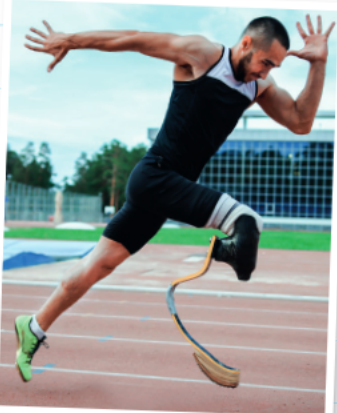 Prosthetic technology represents one of the most exciting areas of development in assistive devices. Modern prosthetics go far beyond simple replacement limbs and can now respond to electrical signals from the user's body.
A prosthetic is any artificial body part designed to replace a missing or damaged part of the body. This includes limbs, hearts, and even retinal implants for vision restoration. The latest prosthetic limbs can be controlled by detecting electrical activity in the user's muscles, allowing them to move the artificial limb just by thinking about the movement they want to make.
Note
Advanced Prosthetic Control
Modern prosthetic limbs use myoelectric sensors to detect tiny electrical signals produced by muscle contractions. When a user thinks about moving their missing limb, their brain still sends signals to the muscles in the residual limb. These sensors can detect these signals and translate them into precise movements of the prosthetic device.
This technology gives users a remarkable degree of control and can enable them to perform complex tasks that would have been impossible with older prosthetic designs. Professional athletes with prosthetic limbs can now compete at the highest levels, demonstrating the incredible potential of this technology.
Design for elderly people
The average age of the population is steadily increasing, largely due to the baby boom generation born in the 1960s now reaching older age, combined with improvements in healthcare that have extended life expectancy. This demographic shift means that designing for elderly users has become a priority for technology developers.
It's essential that we address the specific needs of older people to ensure they can maintain their independence, stay connected with others, and continue to feel valued and engaged in society.
Important
Demographic Reality
The ageing population represents one of the most significant social changes of our time. By 2050, the number of people aged 60 and over is projected to reach 2.1 billion globally. Technology designers who ignore this demographic shift do so at their own peril.
Communication and social connection
Technology can help elderly people stay connected with family and friends, reducing isolation and loneliness. Communication technologies specifically designed for older users often feature:
- Larger text and buttons for easier use
- Simplified interfaces that are less confusing
- Voice-activated controls that don't require fine motor skills
- Video calling capabilities that allow face-to-face conversations with distant relatives
Social media platforms and monitoring devices can also help family members keep in touch with elderly relatives and ensure they are safe and well.
Mobility and transportation solutions
As people age, they may find it more difficult to get around independently. Technology can help address these challenges through:
- Transportation apps: Services that make it easier to book taxis or ride-sharing services
- Mobility aids: Electric scooters, walking frames with built-in navigation, and other devices that help people move around safely
- Public transport assistance: Apps and devices that provide real-time information about bus and train services
Independence support systems
Many elderly people want to continue living in their own homes for as long as possible. Technology can support this independence through:
- Smart home systems that can be controlled by voice or simple interfaces
- Medication reminders and dispensers
- Emergency alert systems that can call for help if needed
- Home monitoring systems that can detect falls or other emergencies
Example
Worked Example: Smart Home Independence System
Scenario: 78-year-old user wants to maintain independence while family ensures safety
Technology Solution:
- Voice-controlled lighting and heating systems
- Automated medication dispenser with alerts
- Wearable device that detects falls and calls emergency services
- Video doorbell for secure visitor identification
- Smart sensors that monitor daily routines
Result: User maintains independence while family receives alerts only when genuinely needed, reducing anxiety for all parties involved.
Design for different religious groups
When developing technology products, designers must be sensitive to the beliefs and practices of different religious communities. This requires genuine consultation with religious groups to understand their needs and ensure that products are appropriate and respectful.
Understanding diverse needs
Different religious groups may have varying requirements when it comes to technology use. What might be perfectly acceptable to one community could be inappropriate or offensive to another. This is why consultation and research are essential in the design process.
Some manufacturers create multiple versions of the same product to address the specific needs of different religious groups, rather than trying to create a one-size-fits-all solution that might not fully meet anyone's requirements.
Important
Religious Sensitivity Warning
Never assume that what works for one religious group will work for another. Colours, symbols, languages, and even functionality that seems neutral can have deep religious significance. Always consult with religious leaders and community members before finalising designs intended for religious use.
Technology supporting religious practice
Modern technology can actually enhance religious practice and community connection in many ways:
- Digital prayer resources: Apps that provide prayer schedules, text, and audio recordings
- Community communication: Platforms that help religious communities stay connected and share information
- Educational resources: Digital access to religious texts, teachings, and learning materials
- Virtual participation: Technology that allows people to participate in religious services remotely when they cannot attend in person
However, developers must be careful about language, imagery, and cultural sensitivity. Using inappropriate wording, colours, or symbols could inadvertently offend some religious groups while being perfectly acceptable to others.
Note
Cultural Adaptation Strategy
Successful religious technology often involves creating region-specific versions rather than universal solutions. This might mean different colour schemes, alternative terminology, or modified functionality to respect local customs and beliefs.
Real-world applications
These inclusive design principles are being applied across many different types of technology. From smartphone apps with accessibility features to smart home systems designed for elderly users, the focus on inclusive design is making technology more accessible to everyone.
The key to successful inclusive design is understanding that accessibility benefits everyone, not just the specific groups being targeted. For example, voice control systems designed for people with mobility issues also help busy parents who have their hands full, and large text options designed for elderly users also benefit people using devices in bright sunlight.
Example
Worked Example: Universal Design Benefits
Original Target: Large buttons on smartphone interfaces for elderly users with reduced dexterity
Unexpected Benefits:
- Parents holding babies can use phones one-handed more easily
- People wearing gloves in cold weather can operate devices
- Users in bumpy vehicles (buses, trains) have better accuracy
- People with temporary injuries (broken fingers, bandages) benefit
Lesson: Designing for specific accessibility needs often creates better experiences for everyone.
Summary
Key Points to Remember:
- One billion people worldwide live with disabilities and can benefit from assistive technology solutions
- Inclusive design creates products that work for as many people as possible, regardless of their abilities or background
- Prosthetic technology now allows users to control artificial limbs through electrical signals from their muscles
- Elderly users need technology that supports communication, mobility, and independence as the population ages
- Religious sensitivity requires consultation with different communities to ensure technology is appropriate and respectful
- Universal benefits - designing for accessibility often improves the experience for all users, not just the target group