Systems approach to designing (AQA GCSE Design and Technology): Revision Notes
📚Revision Notes
Systems approach to designing
What is a systems approach?
A systems approach is a powerful method that helps designers tackle complex problems by breaking them down into smaller, more manageable steps. Instead of trying to understand every tiny detail of a complicated process, this approach allows you to focus on the main stages and how they connect together. This makes it much easier to design, understand, and improve systems.
Note
Think of it like following a recipe - you don't need to understand the chemistry of baking, but you need to know the main steps: mix ingredients, bake, cool, and serve.
The three components of any system
Every system, no matter how complex, has three essential parts that work together:
Input - This is what goes into the system to start the process. It could be movement (like pressing a switch), energy, materials, or information. For example, in a heating system, the input might be you setting the temperature on a thermostat.
Process - This is where the actual work happens. It's the device or mechanism that transforms the input into something useful. In our heating example, this could be the boiler that heats the water or the radiators that warm the room.
Output - This is the final result you want from the system. It's what comes out after the process is complete. For the heating system, the output would be warm air that heats your room, or the movement of a motor, or sound from a speaker.
Example
Practical Example: Heating System Components
- Input: Setting the thermostat to 20°C
- Process: Boiler heating water, pump circulating hot water through radiators
- Output: Warm air heating the room to the desired temperature
Understanding flow charts
Flow charts are visual tools that help us map out how systems work. They use special symbols and arrows to show the sequence of operations in a clear, easy-to-follow way. Think of them as a roadmap for your system.
The key symbols you need to know are:
- Terminator (oval shape): Shows the start and end points of your process
- Flow line (arrows): Shows the direction the process moves in
- Process box (rectangle): Represents an action or operation that happens
- Decision diamond: Shows where a yes/no decision needs to be made
Note
Flow charts use standardised symbols so that anyone can read and understand them, regardless of the specific system being described. This makes them a universal language for designers and engineers.
Open loop systems
An open loop system is like a one-way street - information flows in one direction only, and there's no way for the system to check if it's working properly or make adjustments.
Example
Open Loop Heating System Example
In a simple heating system using open loop control:
- You switch on the heating manually
- The boiler heats the water
- The hot water heats the radiators
- This continues until you physically switch it off
The system doesn't know if the room has reached the right temperature - it just keeps going.
Open loop systems are simple and cheap to build, but they're not very efficient because they can't adapt to changing conditions.
Important
Key Limitation of Open Loop Systems
Open loop systems cannot automatically adjust their performance. Once started, they continue operating at the same level regardless of whether the desired output has been achieved. This can lead to waste of energy and resources.
Closed loop systems
Closed loop systems are much smarter because they include feedback - they can monitor their own output and make automatic adjustments. It's like having a built-in quality control system.
Example
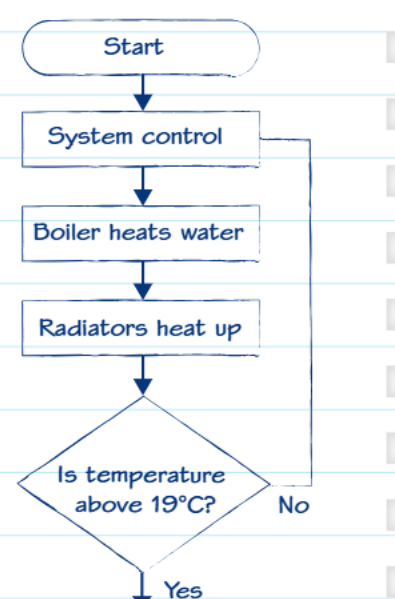
Closed Loop Temperature-Controlled Heating System
Step-by-step process:
- The heating system gets switched on
- The boiler heats the water
- The hot water heats the radiators
- A temperature sensor (thermostat) continuously measures the room temperature
- The system asks: "Is the temperature above the target (like 19°C)?"
- If NO, it continues heating
- If YES, it switches off automatically
- The process repeats as needed to maintain the right temperature
This automatic feedback means the system can maintain the perfect temperature without any human intervention, making it much more efficient and convenient.
Note
The key difference is that closed loop systems continuously monitor their performance and adjust automatically. This self-regulating capability makes them ideal for applications where consistent output is important.
Practical applications
Systems thinking is everywhere around us. Whether it's your smartphone responding to touch, a washing machine running different cycles, or traffic lights controlling flow at intersections - they all use these same principles of input, process, and output, often with feedback loops to ensure they work effectively.
When designing any new technology, engineers start by identifying what inputs they need, what processes will transform those inputs, and what outputs they want to achieve. Then they decide whether the system needs feedback to monitor and adjust its performance.
Summary
Key Points to Remember:
- A systems approach breaks complex processes into simple, manageable steps using Input → Process → Output
- Flow charts use standard symbols (ovals, rectangles, diamonds, arrows) to visually map out how systems work
- Open loop systems work in one direction only with no feedback - simple but less efficient
- Closed loop systems include feedback mechanisms that allow automatic monitoring and adjustment
- Most modern systems use closed loops because they can adapt and maintain optimal performance automatically